
NEXXT Nyx1200-AC Plus Dual Band AC Wireless Router User Guide


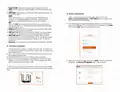






• Internet info: Displays the connection status, the software version,
assigned IP address, default gateway and other related data.
• Wi-Fi name and password. This menu turns the 2.4GHz and 5GHz
bands on or off, hides the Wi-Fi networks from view and it also allows
the user to change the SSID names and wireless passwords of each
channel.
• Reboot: When the router is not functioning properly, click this button
to restart the device
• Internet settings: Opens up the menus to configure the PPPoE,
Dynamic IP, and Static IP connection types.
FCC statement
This equipment has been tested and found to comply with the limits for
a Class B digital device, pursuant to part 15 of the FCC Rules. These
limits are designed to provide reasonable protection against harmful
interference in a residential installation. This equipment generates,
uses and can radiate radio frequency energy and, if not installed and
used in accordance with the instructions, may cause harmful interfe-
rence to radio communications. However, there is no guarantee that
interference will not occur in a particular installation. If this equipment
does cause harmful interference to radio or television reception, which
can be determined by turning the equipment off and on, the user is
encouraged to try to correct the interference by one or more of the
following measures:
• Login password: Changes the passkey of the AC wireless router.
• System update: Brings the application up to date.
• LED control: Turns the LED lights on or off to save energy.
• Reset: Returns the AC wireless router to its factory default settings.
- Reorient or relocate the receiving antenna.
- Increase the separation between the equipment and receiver.
- Connect the equipment into an outlet on a circuit different from that
to which the receiver is connected.
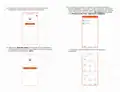
12. The Nexxt Wireless app provides the following smart functions:
- Consult the dealer or an experienced radio/TV technician for help.
Caution!
Any changes or modifications not expressly approved by the party
responsible for compliance could void the user's authority to operate
the equipment.
FCC ID: X4YNX12ACP (NCR-X1200)
• Accelerate Wi-Fi: Optimizes the device performance by selecting the
best available resources for signal transmission.
• Guest network: If enabled, it provides authorized visitors access to
your internet connection in a segmented network.
• Wi-Fi schedule: Sets a schedule for the router to broadcast or
disable the wireless signal.
• Transmit power: One touch optimization that allows the selection of
the signal strength based on your coverage requirements.
• Security check: Scans the current status of the network to detect
potential threats or any security issues.

| General | Details |
|---|---|
| Name | NEXXT Nyx1200-AC Plus Dual Band AC Wireless Router User Guide |
| Make | NEXXT |
| Language | English |
| Filetype | PDF (Download) |
| File size | 1.18 MB |
 (1 votes, average: 5.00 out of 5)
 Loading...
If you have any questions regarding NEXXT Nyx1200-AC Plus Dual Band AC Wireless Router User Guide, please ask here and describe the problem in detail.

NEXXT AX18DO Dual Band Mesh Router Instruction Manual

NEXXT NCM-C1200 Bolt AC 1200 Router User Guide

NEXXT NCM-X3000 Bolt AX3000 Router User Guide

REYEE AX3000 Home Wi-Fi Router Instruction Manual

TP-Link Archer MR600 Wireless 4G LTE Router Installation Guide

QUARK-ELEC QK-R041 Wireless 4G LTE Router User Guide

NET MODULE NB1601 Router User Manual

ASUS TUF-AX4200 Dual Band WiFi Router User Guide

Urant UNT8 Wireless Router Installation Guide

Zbtlink WE2805-B 4G LTE Router User Guide

DrayTek Vigor3910 Series Multi-WAN Security Router User Guide

unifi DPN-FX3060V Optical Network Router User Manual

TP-Link AXE7800 Tri-Band Wi-Fi 6E Router Installation Guide