
NEXXT Nyx1200-AC Plus Dual Band AC Wireless Router User Guide


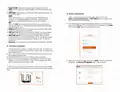


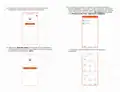



10. The interface with the list of connected devices will be displayed.
From now on, you will be able to make changes to your device
anywhere in the world, at any time. To do so, on the right-hand side
corner of the screen, select Tools to access the main Router
settings and the Smart apps.
8.The following user interface screen will come up when using the
router for the first time.
9. Click on Control now to access the newly configured AC wireless
router. Now you will be prompted to enter admin, the default
password.
11. The Nexxt Wireless app provides the following settings:

| General | Details |
|---|---|
| Name | NEXXT Nyx1200-AC Plus Dual Band AC Wireless Router User Guide |
| Make | NEXXT |
| Language | English |
| Filetype | PDF (Download) |
| File size | 1.18 MB |
 (1 votes, average: 5.00 out of 5)
 Loading...
If you have any questions regarding NEXXT Nyx1200-AC Plus Dual Band AC Wireless Router User Guide, please ask here and describe the problem in detail.

NEXXT AX18DO Dual Band Mesh Router Instruction Manual

NEXXT NCM-X3000 Bolt AX3000 Router User Guide

NEXXT NCM-C1200 Bolt AC 1200 Router User Guide


NETGEAR NIGHTHAWK BE18000 Tri Band Wi-Fi 7 Router User Guide

HKBN AX5400 Oppo WiFi 6 Router User Guide

D-Link BE7200 Wi-Fi 7 Router User Manual

Cudy WR1500 Wi-Fi 6 Router Installation Guide

LANCOM SYSTEMS VPN 1900EF Router Instruction Manual

CP PLUS DN211-S Dual-Band 4G Router Installation Guide

CONTEMPORARY CONTROLS BASRTSX-B Multi Network Router Installation Guide

UBIQUITI AFi-HD Amplifi 4-Ports Home Wi-Fi System AFI HD Wireless Router User Guide

deco X50 Modem Unboxing Router User Guide

STRONG 4G LTE Wi-Fi Router Installation Guide