
NEXXT Nyx1200-AC Plus Dual Band AC Wireless Router User Guide


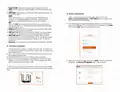





1. Power DC-IN: Connect the supplied power adapter to this jack.
2. Wi-Fi: Use this button to enable/disable the wireless function on the
router.
3. WPS/RST: Use this button to start the WPS negotiation process, or
to reset the router.
WPS:
4. Router configuration
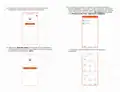
1. Open a web browser to access the main web interface. Type
and press Enter on the keyboard.
Press and hold for 1 to 3 seconds to use the WPS feature (if
enabled). To successfully establish a WPS link, within the first 2
minutes the wireless client’s WPS feature must be enabled.
RST
When the SYS LED blinks, press and hold this button for about 8
seconds and release it. The router is reset successfully when all LED
indicators light up once.
2. The default Login screen will be displayed. Select the language and
enter the credentials. The default username and password is admin.
Click on the Login button to initiate the process.
4. WAN port: This RJ45 port is where you will connect the DSL/cable
modem or ethernet line from your ISP.
5. LAN port 1/2: Connect your local wired devices such as computers
or switches in your network to any of these RJ45 ethernet ports.
6. IPTV/LAN port 3: This is a LAN port by default. When the IPTV
feature on the router is enabled, this port can be used for connecting
an Internet Protocol receiver to stream videos on your TV set via a
set-top box.
7. Antennas: It is equipped with five dual-band omnidirectional antennas.
3. Hardware installation
1. First determine the optimum location for the router. The best place
is usually at the center of your wireless network with the antennas in
the upright position.
2. Then, connect the modem to the internet port of the router using
the supplied ethernet cable.
3. Connect your PC to the router if using a wired connection.
4. Insert one end of the supplied power adapter to the AC input jack
located on the rear panel of the router, before plugging the other
end to a standard electrical wall outlet.
3. Select your connection type and click on Next. For the purposes of
this guide, the Dynamic IP Address option was selected.
TIP If you access the internet without a modem, connect the WAN
port of the router to the ethernet port of you computer using a network
cable.
1
4
2
3

| General | Details |
|---|---|
| Name | NEXXT Nyx1200-AC Plus Dual Band AC Wireless Router User Guide |
| Make | NEXXT |
| Language | English |
| Filetype | PDF (Download) |
| File size | 1.18 MB |
 (1 votes, average: 5.00 out of 5)
 Loading...
If you have any questions regarding NEXXT Nyx1200-AC Plus Dual Band AC Wireless Router User Guide, please ask here and describe the problem in detail.

NEXXT AX18DO Dual Band Mesh Router Instruction Manual

NEXXT NCM-C1200 Bolt AC 1200 Router User Guide

NEXXT NCM-X3000 Bolt AX3000 Router User Guide


Ruijie RG-EG105G(V2) Cloud Managed Router User Guide

MERCUSYS 300Mbps Enhanced Wireless N Router MW325R User Manual

Mercury TD-W8960 Modem Router User Manual
Cudy AC1200 WiFi Mesh Router User Guide

LINKSYS N600 Dual Band Router User Guide

TP-Link TL-WR802N 300Mbps Wireless N Nano Router User Manual

Cudy LT400 4G Wi-Fi Router Installation Guide

Qolsys IQ WiFi 6 Router Instruction Manual

Ruijie RG-EG105GW-X Wi-Fi High Performance Router User Manual

MOXA TN-5916 ToughNet NAT Router Installation Guide