
Prana Air Ambient Lite GSM Router Instruction Manual


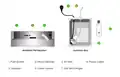

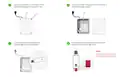





Wall Mounting
You will find the slot for a aluminum
clamp at the back of the device.
Insert the aluminum clamp into the given
slot and ensure it is with the center aligned.
1
2
Rotate the monitor to face forward and
position it in the desired mounting location.
Align and position the device securely
using the screws (included in the box).
3
4

| General | Details |
|---|---|
| Name | Prana Air Ambient Lite GSM Router Instruction Manual |
| Make | Prana Air |
| Language | English |
| Filetype | PDF (Download) |
| File size | 2.74 MB |
 (1 votes, average: 5.00 out of 5)
 Loading...
If you have any questions regarding Prana Air Ambient Lite GSM Router Instruction Manual, please ask here and describe the problem in detail.


MetaBlox MBWF-P100 WiFi Router User Guide

inhand IR305 LTE Router Instruction Manual

AZORES AX3000 PRO WiFi-6 Wireless Router Instruction Manual

Teltonika RUT241 LTE Router Owner’s Manual

TP-Link Omada ER8411 VPN Router Instructions

ZYXEL NR2301 5G NR Portable Router User Guide

Actiontec WF-815 Tri-Band Wi-Fi6E Router Owner’s Manual

ATEL WB550 Apex 5G CPE Router Owner’s Manual

D-Link G530 5G NR AX3000 Wi-Fi 6 Router User Guide

vantiva MGA5331 Unveils FWA Modem and Wi-Fi Router User Manual