
Prana Air Ambient Lite GSM Router Instruction Manual


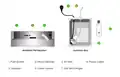

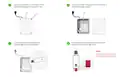





Once you have successfully inserted the SIM in
the dongle, place the USB dongle back in the
junction box by plugging it into the adapter.
Srew the junction box again to close it, ensuring
that all the screws are tightened properly.
5
6
NO
A stable Blue light on the Dongle
signals successful SIM insertion. If
not, please follow the previous
step again.
Plug the power cable into the power socket
to activate the dongle inside.
Look for a micro USB cable on the side of the
junction box and connect it to your monitor
to power it on.
7
8
NOTE : After successfully establishing a GSM connection, skip all other pages and proceed directly to page 15 to add the monitor in the AQI app.

| General | Details |
|---|---|
| Name | Prana Air Ambient Lite GSM Router Instruction Manual |
| Make | Prana Air |
| Language | English |
| Filetype | PDF (Download) |
| File size | 2.74 MB |
 (1 votes, average: 5.00 out of 5)
 Loading...
If you have any questions regarding Prana Air Ambient Lite GSM Router Instruction Manual, please ask here and describe the problem in detail.


TCL HH40L1 Linkhub Router User Manual

Ningbo Sunvot Technology Co Ltd LC600-202302 4G LTE CPE Router User Guide

zpe Nodegrid Virtual Services Router Owner’s Manual

Tenda AC19 Dual Band Gigabit WiFi Router Installation Guide

QUARK-ELEC QK-R041 Wireless 4G LTE Router User Guide

ZYXEL NR2301 5G NR Portable Router User Guide

Harvilon MF302 4G LTE Wi-Fi Router User Guide

Tenda RX27 Pro AX5700 Tri Band Gigabit WiFi 6E Router Installation Guide

NETGEAR LBR20 ORBI LTE Router Instructions

Tenda AXE5700 Smart Wi-Fi 6E Router User Manual