
Prana Air Ambient Lite GSM Router Instruction Manual


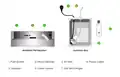






Use a screwdriver to unscrew all the
screws and open the junction box.
Once you open the junction box, look for a
USB Wifi Dongle inside.
1
2
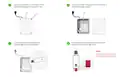
In the Junction box, unplug the
USB dongle from the adapter.
Now, open the dongle by sliding its back
plate and insert the SIM card.
3
4
NOTE :
Insert the SIM in the same
orientation as shown here.

| General | Details |
|---|---|
| Name | Prana Air Ambient Lite GSM Router Instruction Manual |
| Make | Prana Air |
| Language | English |
| Filetype | PDF (Download) |
| File size | 2.74 MB |
 (1 votes, average: 5.00 out of 5)
 Loading...
If you have any questions regarding Prana Air Ambient Lite GSM Router Instruction Manual, please ask here and describe the problem in detail.


Siretta QUARTZ-ONYX 5G NR Router User Guide

TP-Link TL-MR3420 3G and 4G Wireless Router Installation Guide

dahua N300 Wireless Router User Guide

Tenda Wi-Fi 6 Router Installation Guide

TP-Link ER706W-4G Omada 4G Cat6 Gigabit VPN Router Instructions

MERCURY RT-N10E Wireless N150 Router Instructions

Micronet Union Technology WWYLT18 AC1200 Gigabit Dual Band Wi-Fi Router User Guide

HIKVISION AX1500 Pro WiFi Router User Guide

STARLINK GEN 3 WIFI ROUTER Enhancing Homes Router Installation Guide

Digital Yacht NeXuX Connect WiFi Router Installation Guide