
TP-Link C201-V5 Wireless Dual Band Router User Guide





Safety Information
•
•
•
•
•
•
Keep the device away from water, fire, humidity or hot environments.
Do not use damaged charger or USB cable to charge the device.
Do not use any other chargers than those recommended.
Do not use the device where wireless devices are not allowed.
Adapter shall be installed near the equipment and shall be easily accessible.
Use only power supplies which are provided by manufacturer and in the original packing of this product. If you have any questions, please don’t
hesitate to contact us.
•
•
•
•
•
•
For indoor use only.
Do not disassemble, repair or modify the product.
Do not use the product if the casing has been broken. Danger of electric shock.
Never touch the product with wet hands.
Do not expose to heavy rain or any type of moisture.
Do not place near automatically controlled devices such as fire alarms. Radio waves emitted from this product may cause such devices to
malfunction resulting in an accident.
•
•
•
•
Observe restrictions on using wireless products in fuel depots, chemical plants or when blasting operations are in progress.
Do not use liquid to clean the product. Only use a dry cloth.
Never put metal objects inside the product. If a metal object enters the product turn off the circuit breaker and contact an authorised electrician.
This product is not intended to be used when providing medical care. Consult the manufacturer of any personal medical devices, such as
pacemakers or hearing aids to determine if they are adequality shielded from external RF (radio frequency) energy.
•
Do not use this product in health care facilities. Hospitals or health care facilities may be using equipment that could be sensitive to external RF
energy.
•
•
•
•
Do not use this product near water for example near a bath tub, wash bowl, kitchen sink or laundry tub, in a wet basement or near a swimming pool.
The product should be kept free from excessive smoke, dust or high temperature and vibration.
This product should not be exposed to direct sunlight.
Do not place heavy objects on top of the product.
15
•
•
•
When you leave the product unused for a long time unplug the product from the power outlet.
This product may interfere with other electronic products such as TV, radios, personal computers, phones or other wireless devices.
Operating Temperature: 0 °C ~ 40 °C (32 °F ~ 104 °F).
Please read and follow the above safety information when operating the device. We cannot guarantee that no accidents or damage will occur due to
improper use of the device. Please use this product with care and operate at your own risk.
16

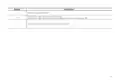
Explanation of the symbols on the product label
Note: The product label is on the bottom of the product and its power supply. Symbols may vary from products
.
Symbol
Explanation
Class II equipment
Class II equipment with functional earthing
Alternating current
DC voltage
Polarity of output terminals
Indoor use only
Dangerous voltage
Caution, risk of electric shock
Energy efficiency Marking
Protective earth
Earth
Frame or chassis
17

| General | Details |
|---|---|
| Name | TP-Link C201-V5 Wireless Dual Band Router User Guide |
| Make | TP-Link |
| Language | English |
| Filetype | PDF (Download) |
| File size | 0.88 MB |
 (1 votes, average: 5.00 out of 5)
 Loading...
If you have any questions regarding TP-Link C201-V5 Wireless Dual Band Router User Guide, please ask here and describe the problem in detail.

TP-Link VR300 Archer Modem Router User Guide

TP-Link T150500-2-DT WiFi Router Instruction Manual

TP-Link Archer AX55 Wi-Fi 6 Router Installation Guide

TP-Link Omada ER8411 VPN Router Instructions

TP-Link Configure VDSL Router User Guide

TP-Link Archer BE805 BE19000 Tri-Band Wi-Fi 7 Router User Manual

TP-Link VR600 Wireless DSL Modem Router Installation Guide

TP-Link AX58 Dual Band Gigabit Wi-Fi 6 Router Installation Guide

TP-Link AC750 Wireless Dual Band Router Owner’s Manual

TP-Link AX6000 8-Stream Wi-Fi 6 Router Installation Guide


ZYXEL USG LITE 60AX Security Router User Guide

Tenda RX27 Pro AX5700 Tri Band Gigabit Wi-Fi 6E Router Installation Guide

PRISMXR P1411 Streaming Link Air Bridge WiFi6 Router User Guide

TP-Link Archer AXE300 Quad-Band Wi-Fi 6E Router Installation Guide

Urocomm UROZETTA 2 4G LTE Mobile Router User Manual

GRANDSTREAM GWN7062E Wi-Fi 6 Router Instruction Manual

TDS Fiber Internet Wireless Router Instructions

LUXUL XWR-1750 Dual Band Wireless AC1750 Gigabit Router User Guide

STRONG REPEATERAX3000 Wi-Fi 6 Repeater 3000 Router User Guide

FiberHome SR120CC Smart Router User Manual