
TP-Link T150500-2-DT WiFi Router Instruction Manual






FCC compliance information statement
Product Name: BE19000 Tri-Band Wi-Fi 7
Router Model Number: Archer BE805
Component Name
I.T.E. Power Supply
Model
T150500-2-DT
Responsible party:
TP-Link USA Corporation
Address: 10 Mauchly, Irvine, CA 92618
Tel: +1 626 333 0234
Fax: +1 909 527 6804
E-mail: sales.usa@tp-link.com
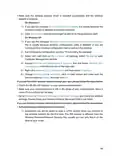
This equipment has been tested and found to comply with the limits for a Class
B digital device, pursuant to part 15 of the FCC Rules. These limits are designed
to provide reasonable protection against harmful interference in a residential
installation. This equipment generates, uses and can radiate radio frequency
energy and, if not installed and used in accordance with the instructions, may
cause harmful interference to radio communications. However, there is no
guarantee that interference will not occur in a particular installation. If this
equipment does cause harmful interference to radio or television reception,
which can be determined by turning the equipment off and on, the user is
encouraged to try to correct the interference by one or more of the following
measures:
• Reorient or relocate the receiving antenna.
• Increase the separation between the equipment and receiver.
• Connect the equipment into an outlet on a circuit different from that to which
the receiver is connected.
• Consult the dealer or an experienced radio/ TV technician for help.
This device complies with part 15 of the FCC Rules. Operation is subject to the
following two conditions:
1. This device may not cause harmful interference.
2. This device must accept any interference received, including interference
that may cause undesired operation.
Any changes or modifications not expressly approved by the party responsible
for compliance could void the user’s authority to operate the equipment.
141

| General | Details |
|---|---|
| Name | TP-Link T150500-2-DT WiFi Router Instruction Manual |
| Make | TP-Link |
| Language | English |
| Filetype | PDF (Download) |
| File size | 0.54 MB |
 (1 votes, average: 5.00 out of 5)
 Loading...
If you have any questions regarding TP-Link T150500-2-DT WiFi Router Instruction Manual, please ask here and describe the problem in detail.

TP-Link VR300 Archer Modem Router User Guide

TP-Link Archer AX55 Wi-Fi 6 Router Installation Guide

TP-Link Omada ER8411 VPN Router Instructions

TP-Link Configure VDSL Router User Guide

TP-Link Archer BE805 BE19000 Tri-Band Wi-Fi 7 Router User Manual

TP-Link VR600 Wireless DSL Modem Router Installation Guide

TP-Link AX58 Dual Band Gigabit Wi-Fi 6 Router Installation Guide

TP-Link AC750 Wireless Dual Band Router Owner’s Manual

TP-Link AX6000 8-Stream Wi-Fi 6 Router Installation Guide

TP-Link TD-W9970 300Mbps Wireless N VDSL ADSL Modem Router User Guide


WAVLINK AC1200 WiFi AP/Router Specifications

Tenda HG Series xPON ONT Network Router Installation Guide

TP-Link VR2100v Wireless Mu Mimo VDSL ADSL Modem Router Instruction Manual

LD-LINK 1200M Dual Band Gigabit Mini Wireless Router User Guide

DrayTek Vigor 1000B Multi WAN Load Balancing Router User Guide

Asustek Computer RT-AX57 Wireless AX3000 Dual Band Gigabit Router User Guide

TP-Link TL-WR846N 300Mbps Wireless Router Instruction Manual

Juniper NETWORKS MX304 Universal Router User Guide

Cudy TR3000 AX3000 2.5G Wi-Fi 6 Mini VPN Router Installation Guide

TP-Link Wireless 4G LTE Telephony Router Installation Guide