
ELTEC CYBOX RT 2-A Wireless Automotive Router Installation Guide








CYBOX RT 2-A
4
MOUNTING
When mounting the CyBox RT 2-A please take the following aspects into account.
•
•
Do not install the device close to any sources of heat such as radiators or heat registers.
Keep the device away from any liquids and avoid exposure to dripping or splashing. The protection
class of the housing is IP40.
•
Keep a free space of at least 150 mm around the housing to ensure adequate heat dissipation
capabilities.
•
•
For optimal heat dissipation the connectors should face down.
The housing provides four mounting cutouts to install the device in horizontal or vertical orientation
on a flat and stable surface.
•
For fixation use M6 screws of sufficient length with additional M6 washers.
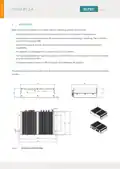
The drawing in Figure 6 shows the outer dimensions of the housing including the position of the mounting
cutouts.
Figure 6
Dimensions of the Housing
9

| General | Details |
|---|---|
| Name | ELTEC CYBOX RT 2-A Wireless Automotive Router Installation Guide |
| Make | ELTEC |
| Language | English |
| Filetype | PDF (Download) |
| File size | 0.29 MB |
 (1 votes, average: 5.00 out of 5)
 Loading...
If you have any questions regarding ELTEC CYBOX RT 2-A Wireless Automotive Router Installation Guide, please ask here and describe the problem in detail.

ELTEC CYBOX RT 2-A Automotive Wireless Router Instructions


UfiSpace S9600-64X 100G Aggregation Router Installation Guide

wildanet Adtran Broadband Router User Guide

APRISM MI12 AX6000 Wi-Fi 6 Dual Radio Router User Guide

dahua N300 Wireless Router User Guide

hitron ARIA2513 Wifi Router Installation Guide

JUniPer MX304 Universal Router User Guide

MikroTik RBwAPG-5HacD2HnD Wireless Router User Guide

NETGEAR AX1800 WiFi 6 Router User Guide

xiaomi AX3200 Wifi 6 Dual Band Router User Manual

HUAWEI WS7100 V2 WiFi 6 Plus WiFi Router User Guide