
Home > FALCON technology > FALCON technology 4G Combo Combined Antenna and Router User Manual
FALCON technology 4G Combo Combined Antenna and Router User Manual







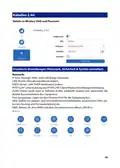


Security:
MAC address filter: set client MAC to visit internet.
IP address filter: set client IP to visit internet.
Domain filter: set domain which allow visit.
WPS/WIFI schedule: Set the time to open and close the wifi .
Remote web: set listen IP.
System:
Time zone, firmware update, backup/restore, router password, language (Auto,
English, and Chinese) time restarted (can set timed restart 00:23hour and
00:59miniute) reboot, reset.
CAUTION: Please do not power off the unit during a firmware update. This may create
a system malfunction.
APN (Access Point Name) Details
When inserting your sim-card into the 4G router it should connect automatically
but in the event it doesn’t, the contents of this addendum are intended to assist
with clearer instruction on manually setting up your internet service provider (ISP)
Access Point Network APN details.
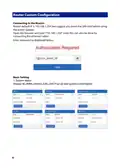
Step 1: Type the following into your web browser: 192.168.1.254
Step 2: Type the password: F@1con_admin_99
10

| General | Details |
|---|---|
| Name | FALCON technology 4G Combo Combined Antenna and Router User Manual |
| Make | FALCON technology |
| Language | English |
| Filetype | PDF (Download) |
| File size | 0.63 MB |
 (1 votes, average: 5.00 out of 5)
 Loading...
If you have any questions regarding FALCON technology 4G Combo Combined Antenna and Router User Manual, please ask here and describe the problem in detail.


FiberHome SR120CC Smart Router User Manual

D-Link AX3200 Smart Router Owner’s Manual

ASUS RT-AC86U AC2900 WiFi Gaming Router User Guide

ZYXEL NR5309 5G NR Router User Guide
NETGEAR Nighthawk AXE11000 Tri-Band WiFi 6E Router RAXE500 User Manual

Beijer CloudVPN Gateway Router User Guide

HUAWEI 5G CPE Pro 2 WiFi 6 Router User Guide

NETGEAR RS100 Wi-Fi 7 Router Instructions

KEENETIC KN-1310 Wireless Router User Guide

caravansplus RV WI-FI Dishydock Router User Guide