
Home > FALCON technology > FALCON technology 4G Combo Combined Antenna and Router User Manual
FALCON technology 4G Combo Combined Antenna and Router User Manual


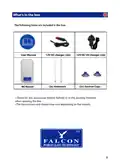







Quick Setup Guide
Step 1: Insert your sim card (Requires preloaded data from your provider).
Step 2: Plug in the device.
Step 3: Use your mobile phone, tablet, or computer to search and connect to the
network “Falcon4G”:
Step 4: Enter Password: F@1con_99
Step 5: Confirm signal by checking the 2 green bars on the side of the router:
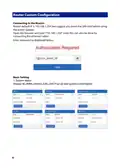
Step 6: Turn to Page 10 & 11 for APN settings,
if you are connected without internet
Step 7: Enjoy your browsing experience.
Router Inputs
LAN
Reset Power
SIM
*SIM slot requires a standard sim card or adaptor for micro or nano sim.
4

| General | Details |
|---|---|
| Name | FALCON technology 4G Combo Combined Antenna and Router User Manual |
| Make | FALCON technology |
| Language | English |
| Filetype | PDF (Download) |
| File size | 0.63 MB |
 (1 votes, average: 5.00 out of 5)
 Loading...
If you have any questions regarding FALCON technology 4G Combo Combined Antenna and Router User Manual, please ask here and describe the problem in detail.


SMAWAVE SRE410 LTE CPE Router User Guide

NETGEAR AXE7800 Tri-Band WiFi 6E Router User Manual

KAON BROADBAND AR1840 WiFi Router Installation Guide

FALCON 1800 5G Ready Omni Directional Antenna Plus Router User Manual

xunison Hub M50 Mesh Tower High Performance Router User Guide

VIMAR 01507 By me KNX Router Instruction Manual

Calix BLAST u6 Gigaspire Mesh WiFi 6 Router User Guide

DIGITAL YACHT Littoral Link 4G Router Instruction Manual

LANCOM 1781-4G VPN Router User Guide

TELTONIKA Networks RUT241 LTE Router User Guide