
Home > FALCON technology > FALCON technology 4G Combo Combined Antenna and Router User Manual
FALCON technology 4G Combo Combined Antenna and Router User Manual



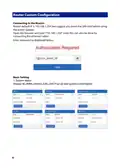




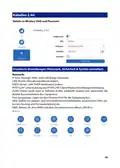


Wireless 2.4G
Wireless SSID and Password details:
Advanced Setting (set network, security & system)
Network:
IP pass-through: make WAN and LAN bridge.
LAN: modify router manage address.
DHCP server: modify LAN DHCP address pool.
PPTP/L2TP: support PPTP/L2TP client mode setting connect.
VLAN: this device can be divided to several VLAN and support computer’s direct
communication.
Port mirroring: set mirroring monitor port.
QOS: set upload and download speeds, dynamic DNS, static routing, and port
forwarding.
DMZ: assign LAN IP open to WAN and host name.
9

| General | Details |
|---|---|
| Name | FALCON technology 4G Combo Combined Antenna and Router User Manual |
| Make | FALCON technology |
| Language | English |
| Filetype | PDF (Download) |
| File size | 0.63 MB |
 (1 votes, average: 5.00 out of 5)
 Loading...
If you have any questions regarding FALCON technology 4G Combo Combined Antenna and Router User Manual, please ask here and describe the problem in detail.


UniFi A3000 WiFi 6 Router User Manual

Superbox S3PRO Router User Guide

mine media M4 4g LTE Bonding Router User Manual

GRANDSTREAM GWN7062E Wi-Fi 6 Router Instruction Manual

ASUS RT-AXE7800 Wireless AXE7800 Tri Band Gigabit Router User Guide

CONTEMPORARY CONTROLS BASRTSX-B Multi Network Router Installation Guide

QiXiang Technology QX210 Cellular Router Owner’s Manual

TP-Link AC1900 Archer AC1900 MU-MIMO Wi-Fi Router User Guide

ASUS GT-AX6000 Dual-Band WiFi 6 Gaming Router User Guide

motorola Cable Modem Plus N450 Router User Guide