
Home > FALCON technology > FALCON technology 4G Combo Combined Antenna and Router User Manual
FALCON technology 4G Combo Combined Antenna and Router User Manual







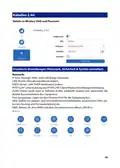


Weitverkehrsnetz
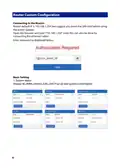
Optionen zur Auswahl von DHCP, Statisch (feste IP) oder PPPoE
DHCP ist der Standard in diesem Gerät und kann sich je nach ISP im Laufe der Zeit
ändern. Static ist fest und wird sich nie ändern. PPPoE ermöglicht es dem Modem,
ein Teil des Netzwerks zu sein, das mehrere Benutzer nutzen können, anstatt direkt
mit dem Computer verbunden zu sein. Wir empfehlen, diese Einstellungen nicht zu
ändern.
18

| General | Details |
|---|---|
| Name | FALCON technology 4G Combo Combined Antenna and Router User Manual |
| Make | FALCON technology |
| Language | English |
| Filetype | PDF (Download) |
| File size | 0.63 MB |
 (1 votes, average: 5.00 out of 5)
 Loading...


UfiSpace S9600-32X 100G Aggregation Router Installation Guide

Inverto OneNet PROx MESH WI-FI Router User Guide
SECU365 SS-1 Router User Guide

inseego 5G Router FG2000e User Guide

Singtel XGSPON Optical Network Router Installation Guide

Tenda 4G185 4G/3G Portable Mobile Hotspot Router User Guide

Cudy WR1200 AC1200 Dual Band Smart Wi-Fi Router Installation Guide

D-Link G530 5G Router Instructions

TP-Link Archer AX3200 Tri Band Wifi 6 Router Installation Guide

TP-Link MR505 Wireless 4G LTE Router Installation Guide