
Home > FALCON technology > FALCON technology 4G Combo Combined Antenna and Router User Manual
FALCON technology 4G Combo Combined Antenna and Router User Manual









Router Custom Configuration
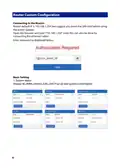
Connecting to the Router:
Router default IP is 192.168.1.254 (we suggest you insert the SIM card before using
the power supply).
Open the browser and type “192.168.1.254”(note this can also be done by
connecting the ethernet cable).
Enter password as displayed below:
Basic Setting
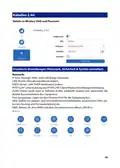
1. System status
Display 4G, WAN, wireless 2.4G, DHCP server and system’s information
Falcon4G
6

| General | Details |
|---|---|
| Name | FALCON technology 4G Combo Combined Antenna and Router User Manual |
| Make | FALCON technology |
| Language | English |
| Filetype | PDF (Download) |
| File size | 0.63 MB |
 (1 votes, average: 5.00 out of 5)
 Loading...
If you have any questions regarding FALCON technology 4G Combo Combined Antenna and Router User Manual, please ask here and describe the problem in detail.


LB-LINK BL-AC3600 LTE Router Installation Guide

NETGEAR NIGHTHAWK BE18000 Tri Band Wi-Fi 7 Router User Guide

Spectrum IP6442B WiFi 6E Router User Manual

HITACHI M 12SA2 Bit Machine Molding Router Instruction Manual

TP-Link Omada Gigabit VPN Router ER605 Installation Guide

TP-Link TL-WR902AC Mbps Wireless Portable Mini Travel Router Owner’s Manual

Anywhere AX50 Series Dual Band Gigabit Wi-Fi 6 Router User Guide

D-Link M30 AQUILA PRO AI AX3000 Wi-Fi 6 Smart Mesh Router User Manual

Tenda RX27 Pro AX5700 Tri Band Gigabit WiFi 6E Router Installation Guide

GL iNet AX1800 Slate AX Wireless Router User Manual