
Cudy AC1200 Dual Band Unlocked 4G LTE Modem Router Installation Guide




EN
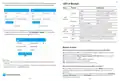
4. Then please check 4G information card of the status page. If the status
is connected, means connected to the internet successfully.
LED and Button
Name
Status
Indication
4G
4G
Red
Internet is not connected
4G or WAN Internet is connected
2/3G is Connected
Status
Connected
Status
Not connected
Solid On
Blue
Purple
RSSI
22
RSSI
-
System
LED
Red
System is starting up
WPS is in progress
Upload / Download
770.63KB / 681.69KB
Upload / Download
0.00 B / 0.00 B
Flashing
Blue
More Details
More Details
Red-Purple-Blue
Software Upgrading
Connected
Not connected
Power adapter is not connected to the device.
The corresponding ethernet port is connected.
The corresponding ethernet port is not connected.
Press and hold 1 second to enable the WPS function.
Off
On
Ethernet
LED
5. If 4G is not connected, or if you want to customize the router yourself,
click "Quick Setup" and follow the step-by-step instructions to config-
ure the router.
Off
WPS
Button
Press and hold this button for about 6 seconds to
reset the router to its factory default settings.
Reset
Status
Internet
Not connected
4G Router
XXXXX
Work Mode
Model
Need Help?
Q1. What should I do if I cannot access the web management page?
A1: If the computer is set to a static IP address, change its settings to obtain an IP
address automatically.
Quick Setup
web browser.
A3: Use another web browser and try again.
A4: Reboot your router and try again.
A5: Disable and enable the active network adapter in use.
Note:
1, If you are not sure about APN parameters, please contact your internet provider.
2, If you meet any other problems, don't hesitate to contact our technical support
team: support@cudy.com
Q2. How do I restore the router to its factory default settings?
A1: With the router powered on, press and hold the RESET button for 6 seconds
before release. Wait the router resets.
A2: Log in to the web management page of the router, and go to
Advanced Settings >Reset , click Perform Reset and wait until the reset process is
complete.
Enjoy the internet!
— 3 —
— 4 —

| General | Details |
|---|---|
| Name | Cudy AC1200 Dual Band Unlocked 4G LTE Modem Router Installation Guide |
| Make | Cudy |
| Language | English |
| Filetype | PDF (Download) |
| File size | 1.65 MB |
 (1 votes, average: 5.00 out of 5)
 Loading...
If you have any questions regarding Cudy AC1200 Dual Band Unlocked 4G LTE Modem Router Installation Guide, please ask here and describe the problem in detail.

Cudy X6 AX1800 1800mbps Dual Band Wi-Fi 6 Router Installation Guide

Cudy WR1200 AC1200 Dual Band Wi-Fi Router Installation Guide

Cudy WR300 Multi Mode WiFi Router Installation Guide

Cudy TR3000 AX3000 2.5G Wi-Fi 6 Mini VPN Router Installation Guide

Cudy X6 AX1800 Dual Band Gigabit Wi-Fi 6 Mesh Router Installation Guide

Cudy WR1200 Dual Band Wi-Fi Router Installation Guide

Cudy WR3000E Gigabit Mesh WiFi 6 Router Installation Guide

Cudy AC1200 4G LTE Wi-Fi Router Instruction Manual

Cudy LT450 4G LTE AC1200 Dual Band WiFi Router User Manual

Cudy WR1300 Gigabit Dual Band Wi-Fi Router Installation Guide


cisco RV340 Router User Guide

RYOBI A99LM3 Door Latch Router Template Instruction Manual
Cudy AC1200 WiFi Mesh Router User Guide

TP-Link Archer VR600 Wireless DSL Modem Router Installation Guide

Peplink SDX Pro 24Gbps Modular Enterprise Branch Router User Guide

H3C Magic NX15 Wireless Router Installation Guide

FiberHome SR1021Y Wireless Router User Manual

BELKIN F9K1001 N150 Wireless Router User Manual

TP-Link RM100 Router WiFi 4G LTE 300MBPS User Manual

TELTONIKA RUT200 4G Router User Guide