
eero Outdoor 7 Dual Band Mesh Wi-fi Router Installation Guide






01
Determine how you are
connecting to your network.
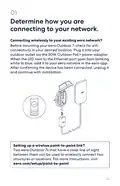
Connecting wirelessly to your existing eero network?
Before mounting your eero Outdoor 7, check for wifi
connectivity in your desired location. Plug it into your
outdoor outlet via the 30W Outdoor PoE+ power adapter.
When the LED next to the Ethernet port goes from blinking
white to blue, add it to your eero network in the eero app.
After confirming the device has been connected, unplug it
and continue with installation.
Setting up a wireless point-to-point link?
Two eero Outdoor 7s that have a clear line of sight
between them can be used to wirelessly connect two
structures or locations. For more instructions, visit
eero.com/setup/point-to-point
04

| General | Details |
|---|---|
| Name | eero Outdoor 7 Dual Band Mesh Wi-fi Router Installation Guide |
| Make | eero |
| Language | English |
| Filetype | PDF (Download) |
| File size | 0.2 MB |
 (1 votes, average: 5.00 out of 5)
 Loading...
If you have any questions regarding eero Outdoor 7 Dual Band Mesh Wi-fi Router Installation Guide, please ask here and describe the problem in detail.

eero 609R010111 6+ Dual-Band Mesh Wi-Fi 6 Router User Guide

eero 7 Dual Band Mesh Wi-Fi 7 Router User Guide

eero Max 7 Mesh Wifi Router Owner’s Manual

eero N010001 AX1800 Dual Band Mesh WiFi 6 Router User Manual

eero V010001 Router User Guide

eero Pro 6E Mesh Router User Guide

eero Pro 6 Mesh Wi-Fi Router User Guide

eero SN10001 Outdoor 7 PoE Mesh Wi-Fi Router Installation Guide


Cudy LT500 Wi-Fi 4G Router Installation Guide

Cudy AX1800 WiFi 6 Mesh Router Instructions

STARLINK Router Installation Guide

NetComm CF40 Wi-Fi 6 Router User Guide

Winext GW5000 A Grade Gateway Router Instructions

TELTONIKA RUT956 Cellular Router Instructions

FALCON 1800 EVO 5G Ready Omni-Directional Antenna Plus Router User Manual

westermo MRD-455-NA Cellular Router User Guide

WATER WORLD AC1200M Wireless Dual Frequency Router User Guide

ASKEY NCM2000B2-D299 5G Home Router User Guide