
MERCUSYS MB112-4G 300Mbps Wireless N 4G LTE Router User Guide






Chapter 10 Specify Your Network Settings
3. Select DHCP to enable the DHCP function and select DHCP Server.
4. Specify the IP Address Pool, the start address and end address must be on the
same subnet with LAN IP. The router will assign addresses within this specified
range to its clients. It is from 192.168.1.100 to 192.168.1.199 by default.
5. Enter a value for the Address Lease Time. The Address Lease Time is the
amount of time in which a DHCP client can lease its current dynamic IP address
assigned by the router. After the dynamic IP address expires, the user will be
automatically assigned a new dynamic IP address. The default is 1440 minutes.
6. Keep the rest of the settings as default and click Save to make the settings
effective.
Notes:
1. The router can be configured to work as a DHCP Relay. A DHCP relay is a computer that forwards DHCP data
between computers that request IP addresses and the DHCP server that assigns the addresses. Each of the
device’s interfaces can be configured as a DHCP relay. If it is enabled, the DHCP requests from local PCs will be
forwarded to the DHCP server that runs on WAN side.
2. You can also appoint IP addresses within a specified range to devices of the same type by using Condition Pool
feature. For example, you can assign IP addresses within the range (192.168.1.50 to192.168.1.80) to Camera
devices, thus facilitating the network management. Enable DHCP feature and configure the parameters according
to your actual situation on Advanced > Network > LAN Settings page.
10. 5. 3. Reserve LAN IP Addresses
You can view and add a reserved address for a client. When you specify an IP address
for a device on the LAN, that device will always receive the same IP address each time
when it accesses the DHCP server. If there are some devices in the LAN that require
permanent IP addresses, please configure Address Reservation on the router for the
purpose.
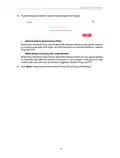
Follow the steps below to reserve an IP address for your device.
2. Go to Advanced > Network > LAN Settings page.
35

| General | Details |
|---|---|
| Name | MERCUSYS MB112-4G 300Mbps Wireless N 4G LTE Router User Guide |
| Make | MERCUSYS |
| Language | English |
| Filetype | PDF (Download) |
| File size | 1.1 MB |
 (1 votes, average: 5.00 out of 5)
 Loading...
If you have any questions regarding MERCUSYS MB112-4G 300Mbps Wireless N 4G LTE Router User Guide, please ask here and describe the problem in detail.

MERCUSYS MR90X Dual Band 8 Stream Wi-Fi 6 Router User Guide

MERCUSYS AC12G Wireless Router Installation Guide

MERCUSYS MB110-4G Mbps Wireless N 4G LTE Router Installation Guide

MERCUSYS MW301R Wireless Router Installation Guide

MERCUSYS MB230-4G Wireless 4G LTE Router Installation Guide

MERCUSYS BE3600 Dual-Band Wi-Fi 7 Router Installation Guide

MERCUSYS 300Mbps Enhanced Wireless N Router MW325R User Manual

MERCUSYS MB110-4G LTE Router User Guide

MERCUSYS MB110-4G 300 Mbps Wireless N 4G LTE Router Installation Guide

MERCUSYS EU2_16 Wireless Router Installation Guide


TELTONIKA Networks RUTM50 Cellular 5G Router User Guide

Milesight UF51 5G CPE Router User Guide

HABITECH Vigor 2865 Series WiFi Router User Guide

LANCOM Systems 1780EW-4G+ High Performance Mobile VPN Router User Guide

technicolor CGA437T Router Instruction Manual

TCL HH40L1 Linkhub Router User Manual

Cudy WR1200 AC1200 Dual Band Wi-Fi Router Installation Guide

eero 7 Dual Band Mesh Wi-Fi 7 Router User Guide

GRANDSTREAM HT812 Powerful 2 Port ATA with Gigabit NAT Router User Guide

ZYXEL NR2301 5G NR Portable Router User Guide