
MERCUSYS MB112-4G 300Mbps Wireless N 4G LTE Router User Guide






Chapter 10 Specify Your Network Settings
Note:
3. If you fail to dial-up Internet access after upgrading to the latest version, please contact the technical support.
4. If your ISP settings are still not detected after upgrading, refer to Create a Connection Profile to add a new internet
connection profile.
10. 3. PIN Management
PIN (Personal Identification Number) is used to protect the SIM card from embezzlement.
PIN Management allows you to easily change the PIN settings of your SIM card as
needed.
Follow the steps below to change your PIN settings.
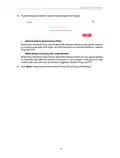
2. Go to Advanced > Network > PIN Management page.
• SIM Card Status - Displays the status of your SIM card.
• PIN Lock - Toggle on to enable PIN Lock. Once it is enabled, every time you start the
router with this SIM card inserted, you need to enter the PIN.
• Auto-unlock PIN - When the PIN is required upon router restarting or inserting a SIM
card, it will be validated automatically, saving you the trouble to enter the PIN each
time you start the router or insert a SIM card. If validation failed, you need to enter
the PIN on this page.
• PIN - Enter the PIN to unlock the SIM card. It consists of 4-8 digits.
• PUK - PIN Unlocked Key, also known as Personal Unlock Code (PUC), is used to reset
a PIN that has been lost or forgotten. The PUK is a SIM-specific code assigned by
the service provider. You need to enter the PUK after 3 incorrect login attempts of
PIN. Contact your service provider if you do not know the PUK. It consists of 8 digits.
• New PIN - Enter 4-8 digits to reset the PIN of your SIM card.
• Remaining Attempts - Shows how many attempts are left for you to try entering
the PIN or PUK. You have only 3 attempts for entering the PIN and 10 attempts for
entering the PUK. If you accidentally fail in 3 attempts, the SIM card will be locked
and you will be required to enter the PUK that is written on your SIM card.
3. Click Save to save the settings.
32

| General | Details |
|---|---|
| Name | MERCUSYS MB112-4G 300Mbps Wireless N 4G LTE Router User Guide |
| Make | MERCUSYS |
| Language | English |
| Filetype | PDF (Download) |
| File size | 1.1 MB |
 (1 votes, average: 5.00 out of 5)
 Loading...
If you have any questions regarding MERCUSYS MB112-4G 300Mbps Wireless N 4G LTE Router User Guide, please ask here and describe the problem in detail.

MERCUSYS MR90X Dual Band 8 Stream Wi-Fi 6 Router User Guide

MERCUSYS AC12G Wireless Router Installation Guide

MERCUSYS MB110-4G Mbps Wireless N 4G LTE Router Installation Guide

MERCUSYS MW301R Wireless Router Installation Guide

MERCUSYS MB230-4G Wireless 4G LTE Router Installation Guide

MERCUSYS BE3600 Dual-Band Wi-Fi 7 Router Installation Guide

MERCUSYS 300Mbps Enhanced Wireless N Router MW325R User Manual

MERCUSYS MB110-4G LTE Router User Guide

MERCUSYS MB110-4G 300 Mbps Wireless N 4G LTE Router Installation Guide

MERCUSYS EU2_16 Wireless Router Installation Guide


Трохи зачекайте…

JUNIPER SSR1400 Session Smart Router User Guide

hitron CODA5x1xQ Series Cable Modem Router User Guide

HABITECH Vigor 2865 Series WiFi Router User Guide

GLOBAL TELECOM TITAN 5000 5G NR and Wi-Fi 6 Router User Guide

Helmholz LTE11 Router Owner’s Manual

Firstnum C401 CPE Router User Manual

AZORES AX3000 PRO WiFi-6 Wireless Router Instruction Manual

NetComm NTC-500 5G IoT Router Instructions

Cudy WR3000H 2.5G Mesh Wi-Fi 6 Router Installation Guide