
TP-Link Archer AX20 AX1800 WiFi 6 WiFi Router User Guide








Chapter 14
Manage the Router
Note:
•
•
During the resetting process, do not turn off or reset the router.
We strongly recommend you backup the current configuration settings before resetting the router.
14. 3. Change the Login Password
The account management feature allows you to change your login password of the web
management page.
Note: If you are using a TP-Link ID to log in to the web management page, the account management feature will be
disabled. To manage the TP-Link ID, go to Advanced > TP-Link ID.
1. Visit http://tplinkwifi.net, and log in with the password you set for the router.
2. Go to Advanced > System > Administration and focus on the Change Password
section.
3. Enter the old password, then a new password twice (both case-sensitive). Click SAVE.
4. Use the new password for future logins.
14. 4. Password Recovery
This feature allows you to recover the login password you set for you router in case you
forget it.
Note: If you are using a TP-Link ID to log in to the web management page, the Password Recovery feature will be
disabled. To manage the TP-Link ID, go to Advanced > TP-Link ID.
1. Visit http://tplinkwifi.net, and log in with the password you set for the router.
2. Go to Advanced > System > Administration and focus on the Password Recovery
section.
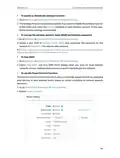
3. Tick the Enable box of Password Recovery.
4. Specify a mailbox (From) for sending the recovery letter and enter its SMTP Server
address. Specify a mailbox (To) for receiving the recovery letter. If the mailbox (From)
to send the recovery letter requires encryption, Tick the Enable box of Authentication
and enter its username and password.
90

| General | Details |
|---|---|
| Name | TP-Link Archer AX20 AX1800 WiFi 6 WiFi Router User Guide |
| Make | TP-Link |
| Language | English |
| Filetype | PDF (Download) |
| File size | 1.24 MB |
 (1 votes, average: 5.00 out of 5)
 Loading...
If you have any questions regarding TP-Link Archer AX20 AX1800 WiFi 6 WiFi Router User Guide, please ask here and describe the problem in detail.

TP-Link Archer AX55 Wi-Fi 6 Router Installation Guide

TP-Link VR300 Archer Modem Router User Guide

TP-Link T150500-2-DT WiFi Router Instruction Manual

TP-Link Omada ER8411 VPN Router Instructions

TP-Link Configure VDSL Router User Guide

TP-Link Archer BE805 BE19000 Tri-Band Wi-Fi 7 Router User Manual

TP-Link VR600 Wireless DSL Modem Router Installation Guide

TP-Link AX58 Dual Band Gigabit Wi-Fi 6 Router Installation Guide

TP-Link AC750 Wireless Dual Band Router Owner’s Manual

TP-Link AX6000 8-Stream Wi-Fi 6 Router Installation Guide

TP-Link VR300 Archer Modem Router User Guide

FALCON 1800 EVO 5G Ready Omni-Directional Antenna Plus Router User Manual

dahua AX1500 Wi-Fi6 Wireless Router Instruction Manual

verizon CR1000 Router Instructions

Cudy LT700 4G LTE CAT 6 Wi-Fi Router Installation Guide

ASUS EBR63 Wireless AX3000 Dual Band Router User Guide

TP-Link WR3002X WiFi 6 Portable Router Installation Guide

Sagemcom SAX2V1S Wave 2 Wireless Router Instruction Manual

TP-Link Archer BE800 BE19000 Tri Band WiFi 7 Router User Manual

Inverto OneNet PROx MESH WI-FI Router User Guide