
UfiSpace S9501-28SMT Gateway Router Installation Guide




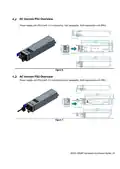

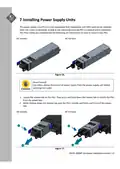

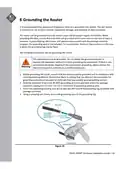


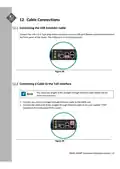
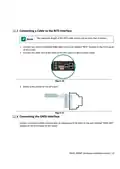
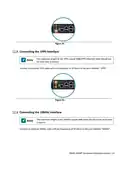
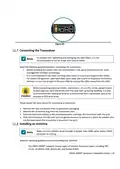





3. Align the new PSU with the power bay, ensuring the PSU’s power connector is in the correct
position.
4. Carefully slide the new PSU into the power bay and gently push until it is flush with the case.
5. An audible click will be heard when the PSU is installed correctly. The PSU will not go in all the
way if it is in the wrong direction.
Illustrations are for reference purposes only. Actual scenario may differ.
DC Version:
AC Version:
Figure 18.
S9501‐28SMT Hardware Installation Guide | 13

| General | Details |
|---|---|
| Name | UfiSpace S9501-28SMT Gateway Router Installation Guide |
| Make | UfiSpace |
| Language | English |
| Filetype | PDF (Download) |
| File size | 0.77 MB |
 (1 votes, average: 5.00 out of 5)
 Loading...
If you have any questions regarding UfiSpace S9501-28SMT Gateway Router Installation Guide, please ask here and describe the problem in detail.

UfiSpace S9500-30XS Gateway Router Installation Guide

ufiSpace S9600-72XC Router Installation Guide

UfiSpace S9600-64X 100G Aggregation Router Installation Guide

UfiSpace S9600-32X 100G Aggregation Router Installation Guide


D-Link DWR-933M Router Owner’s Manual

wis network WIS-N300-LTE 4G LTE Router User Guide

AZORES AX3000 PRO WiFi-6 Wireless Router Instruction Manual

Cudy LT500 Outdoor Router Installation Guide

NETGEAR MR6450 5G Mobiler Router Instruction Manual

COMFAST M0304517 Wireless Router Installation Guide

Cudy WR3000H 2.5G Mesh Wi-Fi 6 Router Installation Guide

Tenda TX2L ProV1.0 WiFi 6 Router Installation Guide

TP-Link TL-MR6500v Wireless 4G LTE Telephony Router User Guide

Firstnum C401 CPE Router User Manual