
UfiSpace S9501-28SMT Gateway Router Installation Guide













Connecting a Cable to the BITS Interface
The maximum length of the BITS cable should not be more than 3 meters.
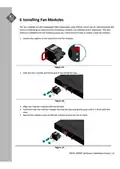
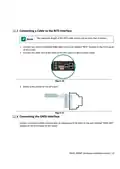
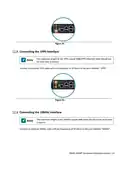
1. Connect one end of a shielded RJ48 cable to the port labelled “BITS” located on the front panel
of the router.
2. Connect the other end of the cable to the BITS patch or demarcation panel.
Figure 30.
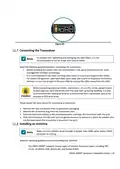
3. Below is the pinout for the BITS port.
Figure 31.
Connecting the GNSS Interface
Connect an external GNSS antenna with an impedance of 50 ohms to the port marked “GNSS ANT”
located on the front panel of the router.
S9501‐28SMT Hardware Installation Guide | 22

| General | Details |
|---|---|
| Name | UfiSpace S9501-28SMT Gateway Router Installation Guide |
| Make | UfiSpace |
| Language | English |
| Filetype | PDF (Download) |
| File size | 0.77 MB |
 (1 votes, average: 5.00 out of 5)
 Loading...
If you have any questions regarding UfiSpace S9501-28SMT Gateway Router Installation Guide, please ask here and describe the problem in detail.

UfiSpace S9500-30XS Gateway Router Installation Guide

ufiSpace S9600-72XC Router Installation Guide

UfiSpace S9600-64X 100G Aggregation Router Installation Guide

UfiSpace S9600-32X 100G Aggregation Router Installation Guide


amped wireless R10000G High Power Wireless N 600mW Gigabit Router User Guide

robustel R3000 Lite Dual-SIM VPN Router User Manual

ESR C4DM-ADAE-C0S0CCLEH-HCv1 4G Hybrid Router Installation Guide

xiaomi AX3000 Whole Home Mesh Wi-Fi Router Instruction Manual

TP-Link ARCHER C7 AC1750 Wireless Dual Band Gigabit Router User Guide

D-Link DIR-X6080Z Multi Gigabit Wi-Fi 6 Router Instruction Manual

D-Link DIR-836L Wireless N750 Dual Band Gigabit Router Installation Guide

THREE CJB74V0HWAAC 4G Plus MiFi Mobile WiFi Router User Guide

Milesight UR35 Dual SIM Router User Guide

ASUS RT-BE92U Tri Band WiFi 7 Router User Guide