
UfiSpace S9501-28SMT Gateway Router Installation Guide













12 Cable Connections
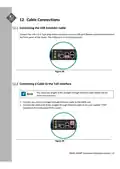
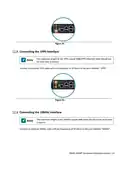
Connecting the USB Extender Cable
Connect the USB 2.0 A Type plug (male connector) into the USB port (female connector) located on
the front panel of the router. The USB port is a maintenance port.
Figure 28.
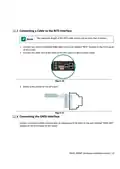
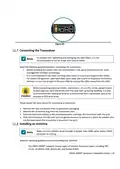
Connecting a Cable to the ToD Interface
The maximum length of the straight‐through Ethernet cable should not be
more than 3 meters.
1. Connect one end of a straight‐through Ethernet cable to the GNSS unit
2. Connect the other end of the straight‐through Ethernet cable to the port marked “TOD”
located on the front panel of the router.
Figure 29.
S9501‐28SMT Hardware Installation Guide | 21

| General | Details |
|---|---|
| Name | UfiSpace S9501-28SMT Gateway Router Installation Guide |
| Make | UfiSpace |
| Language | English |
| Filetype | PDF (Download) |
| File size | 0.77 MB |
 (1 votes, average: 5.00 out of 5)
 Loading...
If you have any questions regarding UfiSpace S9501-28SMT Gateway Router Installation Guide, please ask here and describe the problem in detail.

UfiSpace S9500-30XS Gateway Router Installation Guide

ufiSpace S9600-72XC Router Installation Guide

UfiSpace S9600-64X 100G Aggregation Router Installation Guide

UfiSpace S9600-32X 100G Aggregation Router Installation Guide


xiaomi RA70 Mi Home Router User Guide

DrayTek Vigor2865 Router User Guide

ZYXEL NR5309 5G NR Router User Guide

HFCL 4XIHMR Home Mesh Router User Guide

TP-Link NX600 5G CPE Router Installation Guide

DIGITAL YACHT 4GXtream NMEA 2000 3G or 4G Router Instruction Manual

NETGEAR RS600 Nighthawk Tri Band WiFi 7 Router Instruction Manual

TP-Link Archer C20 Wireless Dual Band Router Installation Guide

ioGiant AX1800 Wi-Fi Router Smart Wireless Router Installation Guide

Linuxiac LinkStar-H68K Portable WiFi Pocket Router User Guide