
Home > DIGITAL DEEP SEA > DIGITAL DEEP SEA 5G Xtream 5G/4G Router Instruction Manual
DIGITAL DEEP SEA 5G Xtream 5G/4G Router Instruction Manual


1. Introduction
Congratulations on the purchase of your 5GXtream 5G/4G Router. This unit is designed for permanent installation on board
a sail or motor boat. The 5GXtream comprises of the following parts;
•
•
•
•
•
•
•
5GXtream Router/Modem unit
2x internal Wi-Fi antennas
2x External 4G LTE antennas, 7m Cables and Mounts
1x External dual 5G LTE antenna and 7m Cables
1x GPS Antenna
1x Power Cable
User Manual
Before operating 5GXtream you should familiarise yourself with this User Manual and the manuals for any
other equipment you wish to connect to it.
2. Before you start
The 5GXtream is configured and controlled via its built-in web interface. In order to access this, you will need a wireless
device such as a PC/Mac, Tablet or Smart Phone running a modern web browser such as Chrome, Safari, Edge or Firefox.
No special drivers or software are required to make the 5GXtream work.
Do not plug in the 5GXtream to the Ethernet port of your computer whilst the 5GXtream is powered up and
always ensure that the 5GXtream antennas are connected before powering up the 5GXtream.
3. Installation
The 5GXtream is designed to be mounted below deck. When deciding on the best location, a central location will give best
Wi-Fi reception in all areas of the boat. You should also consider the 7m coax cable length of the external 5G and 4G
Antennas, which should not be extended. It is better to locate the 5GXtream unit within the 7m limit of the supplied 5G and
4G antenna cables, and then use a wireless repeater if Wi-Fi reception is poor in some areas of the vessel.
If the 5G and 4G antenna cable run is a problem, Digital Deep Sea can supply 10m or 20m antenna cables, but these are
larger and more expensive LMR400 cables (10.5mm Diameter) which must be purchased separately.
The power cable can be easily extended, as can the LAN/WAN Ethernet cables.
The default settings of the 5GXtream have been chosen for optimum performance and we do not
recommend users make any changes to them, except to change the default wireless network name (SSID)
and wireless password.
3.1
Mounting the 5GXtream
The 5GXtream should be mounted in position using M4 screws or other fixings appropriate to the mounting location. It
can be mounted in any orientation, as the Wi-Fi antennas can be rotated and bent for best reception, although we
recommend mounting the 5GXtream vertically with the antennas pointing upwards, to avoid stress on the cables and to
ensure any moisture/condensation falls away from the connectors.
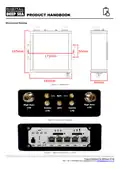
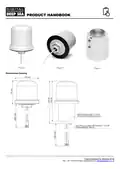
On the next page (Fig.1) is a dimensioned drawing of the 5GXtream. When rotating the supplied Wi-Fi antennas, always
rotate them clockwise to avoid loosening them. Make sure you allow suitable space around the top and bottom of the unit,
to comfortably route the cables (avoiding tight bends) and to secure them so that the weight of the cables is not just being
taken by the cable connectors.
Product Handbook for 5GXtream V1.00

| General | Details |
|---|---|
| Name | DIGITAL DEEP SEA 5G Xtream 5G/4G Router Instruction Manual |
| Make | DIGITAL DEEP SEA |
| Language | English |
| Filetype | PDF (Download) |
| File size | 0.45 MB |
 (1 votes, average: 5.00 out of 5)
 Loading...
If you have any questions regarding DIGITAL DEEP SEA 5G Xtream 5G/4G Router Instruction Manual, please ask here and describe the problem in detail.


Cudy LT500 4G LTE AC1200 Dual Band WiFi Router User Guide
HIKVISION AX1500 Pro WiFi Router User Guide

REYEE RG-E6 WiFi 6 Router Installation Guide

LUXUL XWR-1750 Dual Band Wireless AC1750 Gigabit Router User Guide

WALLYS DR6018-S High Power Radio AP Router User Manual

inhand ER815NRQ3 Wlan Edge Router Installation Guide

hitron CHITA3.1 CHITA-RES Cable Modem Router User Guide
SECU365 SS-1 Router User Guide

EE D412C57 4G Hub Dual Band Router User Guide

rock space RSD0616 AX1800 Wi-Fi6 WiFi Router Installation Guide