
Home > DIGITAL DEEP SEA > DIGITAL DEEP SEA 5G Xtream 5G/4G Router Instruction Manual
DIGITAL DEEP SEA 5G Xtream 5G/4G Router Instruction Manual


3.2
Mounting the 4G LTE Antennas
The 5GXtream is supplied with two high gain 4G LTE antennas, two
base mounts and two 7m lengths of LMR200 coax cables.
Installation and siting of the external LTE antennas is very important for
maximum range, so take your time in working out the best location for
these two antennas.
The 7m LMR200 cables should not be extended and it is better to move
the 5GXtream Router/Modem unit closer to the antennas than extend
the cables. The high frequency 4G/5G signals will be attenuated by
0.3dB per each additional meter of cable, so if you must have a longer
coax cable run, contact Digital Yacht about swapping these cables for
thicker LMR400 cables.
The two LTE antennas should ideally be mounted at least 40cm apart
(1 wavelength) to maximise the positive effect of the MIMO technology
that the 5GXtream uses. It should be noted that there are no significant
additional gains to be made in making the antennas even further apart.
Avoid the antennas being blocked by metal objects and do not place
them close to other high-power transmitting antennas like VHF, HF or
SSB antennas. To avoid the LTE transmissions affecting other devices;
GPS, TV, etc. try to mount them at least 1m away from other antennas.
The external LTE antennas have a 1.25” Pipe Thread and are supplied with two mounts. These mounts, designed for
securing to a horizontal platform, are fine for most installations, but should you wish to use another type of mount such as
those designed for VHF/GPS antennas, then you will need a 1” x 14TPI to 1.25” Pipe Thread adaptor, which are available
from Digital Yacht (P/No.ZCELN280S).
Once a suitable location has been found for the two external LTE antennas, secure the base mounts, attach the N-Type
connectors to the base of each antenna and then route the LMR200 cables through to the Router/Modem unit.
Screw the N-Type connectors from the two LMR200 antenna cables, to the 5GXtream – it does not matter which LTE
antenna goes to which LTE connector.
3.3
Mounting the 5G LTE Dual Antenna
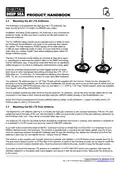
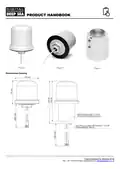
The external 5G LTE antenna (see Fig 4) is actually two high gain antennas in one compact enclosure. The two 7m coax
cables that exit at the base of the unit, are terminated in SMA connectors that screw in to the two matching connectors on
the 5GXtream main unit – they can be connected either way round.
The external LTE antenna can either be flush mounted to a bulkhead (horizontal or vertical), pole mounted or screwed on
to a standard 1”x14TPI mount such as those used for VHF/GPS antennas.
If you wish to flush mount the antenna (NOTE - bulkhead must be no thicker than 12.5mm) then it is necessary to cut a
Ø28mm diameter hole in the bulkhead. The antenna is supplied with a mounting nut and rubber gasket (see Fig 5) and
once the cables are inserted through the bulkhead (and through the mounting nut), tighten the mounting nut to hold the
antenna in place (do not over tighten the nut – torque must be <6Nm).
The antenna is also supplied with a plastic pole mount adaptor and stainless 1”x14TPI thread mount adaptor (see Fig 6).
The pole mount adaptor screws on to the base of the antenna, in place of the mounting nut and can be used to mount the
antenna on a 42mm outside diameter pole. Once the antenna is fitted to the pole, secure it using the two grub screws.
If you wish to mount the external LTE antenna on a standard 1”x14TPI VHF/GPS mount (not supplied), fully insert the
stainless adaptor in to the plastic pole mount adaptor and secure it with the two grub screws. Now screw the antenna on
to the mount.
Product Handbook for 5GXtream V1.00

| General | Details |
|---|---|
| Name | DIGITAL DEEP SEA 5G Xtream 5G/4G Router Instruction Manual |
| Make | DIGITAL DEEP SEA |
| Language | English |
| Filetype | PDF (Download) |
| File size | 0.45 MB |
 (1 votes, average: 5.00 out of 5)
 Loading...
If you have any questions regarding DIGITAL DEEP SEA 5G Xtream 5G/4G Router Instruction Manual, please ask here and describe the problem in detail.


MikroTik C52iG-5HaxD2HaxD-TC Wireless Router User Guide

TP-Link Deco X50-DSL Whole Home Mesh WiFi 6 Router User Guide

NETGEAR RS280 Nighthawk Tri-Band WiFi Router User Guide

Connect Tech Inc Xtreme 10G Managed Ethernet Switch Router User Guide

mine media M4 4g LTE Bonding Router User Manual

WM Systems M2M LTE Cat.4 Router Installation Guide

cimetrics B3075 BACnet-IP to BACnet-IP Router User Guide

zpe Nodegrid Virtual Services Router Owner’s Manual

TP-Link G36W-4G Omada Pro 4G Cat6 Gigabit VPN Router Installation Guide

MOXA EDR-810 Secure Router Installation Guide