
Home > DIGITAL DEEP SEA > DIGITAL DEEP SEA 5G Xtream 5G/4G Router Instruction Manual
DIGITAL DEEP SEA 5G Xtream 5G/4G Router Instruction Manual
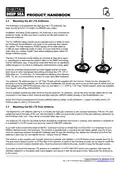
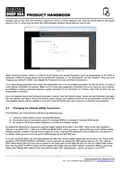


SIM, gold contacts up, into the tray. Finally re-insert the SIM tray ensuring it lines up with the slot and not going in at an
angle. Don’t forget to replace the SIM extractor tool back into its slot for future use.
Figure 7
3.8
Powering Up
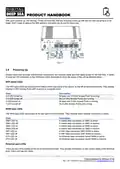
Double check that all power and Ethernet connections are correctly made and then apply power for the first time. A series
of external LED indicators on the 5GXtream which illuminate to show the status of the unit as detailed below….
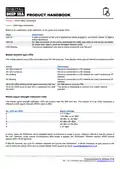
WiFi band LEDs
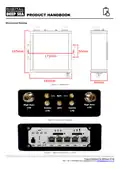
The WiFi band LEDs are located at the bottom of the front panel of the device, to the left of the Ethernet ports. They display
whether a WiFi Access Point (AP) is active on a specific band.
State
Description
2.4 LED turned on.
2.4 LED turned off
5 LED turned on
5 LED turned off
At least one 2.4 GHz Access Point is running.
No 2.4 GHz Access Points are running.
At least one 5 GHz Access Point is running.
No 5 GHz Access Points are running.
WAN type LEDs
The WAN type LEDs are located at the top-right of the front panel. They indicate which Internet connection is active.
State
Description
SIM1 LED on
SIM1 LED off
SIM2 LED on
SIM2 LED off
WiFi LED on
WiFi LED off
ETH LED on
ETH LED off
A mobile data connection on SIM1 is active.
A mobile data connection on SIM1 is inactive.
A mobile data connection on SIM2 is active.
A mobile data connection on SIM2 is inactive.
A WiFi data connection (WiFi WAN) is active.
A WiFi data connection (WiFi WAN) is inactive.
An Ethernet data connection (wired WAN) is active.
An Ethernet data connection (wired WAN) is inactive.
Ethernet port LEDs
There are two LEDs located at the top of each Ethernet port. They provide information on the current states of the Ethernet
ports. Each port has two LEDs:
Product Handbook for 5GXtream V1.00

| General | Details |
|---|---|
| Name | DIGITAL DEEP SEA 5G Xtream 5G/4G Router Instruction Manual |
| Make | DIGITAL DEEP SEA |
| Language | English |
| Filetype | PDF (Download) |
| File size | 0.45 MB |
 (1 votes, average: 5.00 out of 5)
 Loading...
If you have any questions regarding DIGITAL DEEP SEA 5G Xtream 5G/4G Router Instruction Manual, please ask here and describe the problem in detail.


Spectrum 20240729 WiFi 6E Router User Guide

LINKSYS MX4200 Router Installation Guide

ASUS RT-AC67P Dual Band AC Wi-Fi Router User Guide

Inseego FX2000 5G Router User Guide

wildanet Adtran Broadband Router User Guide

mafell LO65EC Wood Carving Hand Router Instruction Manual

ADVANTECH ICR-2041 LTE Router User Manual

NETGEAR RS600 Nighthawk Tri Band WiFi 7 Router Instruction Manual

MERCUSYS EU2_16 Wireless Router Installation Guide

peplink MAX Transit Pro Router User Manual