
Home > DIGITAL DEEP SEA > DIGITAL DEEP SEA 5G Xtream 5G/4G Router Instruction Manual
DIGITAL DEEP SEA 5G Xtream 5G/4G Router Instruction Manual
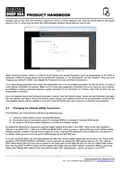


We do not generally recommend changing the Admin password of the router, as this can be difficult to reset when forgotten.
Also, this can only be used by someone wirelessly connected to the 5GXtream, so make sure your wireless security is
good and that you trust the people you allow to connect to the network and there should be no need to change the default
Admin password.
If you do decide to change the Admin password, make sure you record the new password somewhere you can easily refer
to in the future, as resetting this involves a full factory reset.
The key setting that all customers must set are the Wireless Network settings. This secures your 5GXtream and ensures
only you and the people you want to connect, can join the 5GXtream wireless network.
4.1
Changing the APN Settings
Every data SIM network provider has different Access Point Name (APN) settings that allow the 5GXtream to register and
connect to the mobile data network. These settings can usually be found online (Google “APN settings for Vodaphone”)
or requested from the network provider. By default, the 5GXtream will query the SIM that is installed and automatically
select the APN settings from its internal database.
However, we have found that due to recent changes in services, some new SIMs are not included in the database and it
maybe necessary to manually enter some “custom” SIM settings. In the following example, we show the default “Auto
APN” mode and also how to manually enter a “custom” APN, using the recommended Vodaphone settings for monthly
contract SIMs. If the Auto APN settings do not work and you cannot get online, you will need to enter the correct details
for the SIM network provider you are using.
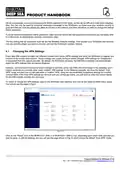
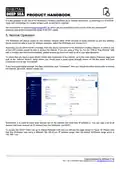
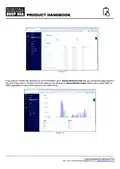
To check or change the APN settings, login to the 5GXtream web interface and click on the Network>WAN menu option.
You should see the page in Fig.9.
Figure 9
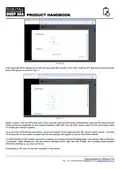
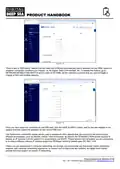
Click on the “Pencil” icon of the MOB1S1A1 (SIM 1) or MOB1S2A1 (SIM 2) row, depending upon which SIM card slot you
wish to setup, to edit the settings and you will see the page shown in Fig.10 which shows the default “Auto APN” mode.
Product Handbook for 5GXtream V1.00

| General | Details |
|---|---|
| Name | DIGITAL DEEP SEA 5G Xtream 5G/4G Router Instruction Manual |
| Make | DIGITAL DEEP SEA |
| Language | English |
| Filetype | PDF (Download) |
| File size | 0.45 MB |
 (1 votes, average: 5.00 out of 5)
 Loading...
If you have any questions regarding DIGITAL DEEP SEA 5G Xtream 5G/4G Router Instruction Manual, please ask here and describe the problem in detail.


ReadyNet AX1500M WiFi6 Wireless Router User Guide

LANCOM SYSTEMS 1790-4G+ High-Performance VPN Router Installation Guide

NETGEAR BE17000 Nighthawk WiFi 7 Tri-Band Router Owner’s Manual

HUAWEI 31500DHA_01 5G CPE Pro 2 WiFi 6 Router User Guide

H3C Magic NX30 WLAN Wireless Router User Guide

TP-Link T120200-2B1 Omada Cat6 Gigabit VPN Router Instructions

Micronet Union Technology WWYLT18 AC1200 Gigabit Dual Band Wi-Fi Router User Guide

DrayTek Vigor2962 High Performance 2.5G Router User Manual

Cisco RV160 Router User Guide

ZYXEL FWA505 5G AX1800 Router User Guide