
Home > DIGITAL DEEP SEA > DIGITAL DEEP SEA 5G Xtream 5G/4G Router Instruction Manual
DIGITAL DEEP SEA 5G Xtream 5G/4G Router Instruction Manual
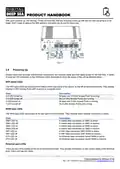


Orange - 10/100 Mbps connection
Green - 1000 Mbps connection
Below is an explanation of the behaviour of the green and orange LEDs.
State
Description
LED on
A data connection on the port is operational (cable plugged in, end device visible, no data is
being transferred).
LED off
No data connection on the port is operational (no cable, bad cable or end device not visible
for some other reason (such as damaged network card)).
Connection established and data is being transferred over this port.
LED blinking
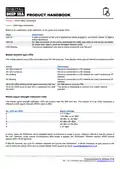
Mobile network type LEDs
The mobile network type LEDs are located near the SIM card slot. They display which type of Internet connection is active.
Action
Description
3G LED turned on
4G LED turned on
3G blinking
Device is connected to a 3G network.
Device is connected to a 4G network.
Device is connected to a 3G network but hasn't received an IP
address.
4G blinking
Device is connected to a 4G network but hasn't received an IP
address.
3G & 4G LEDs blinking at the same time every 500 ms No SIM card or incorrect PIN.
3G & 4G LEDs turns on and off in a sequence one after The device is attempting to connect to a mobile network
t
h
e
o
t
h
e
r
operator.
Mobile signal strength indication LEDs
The mobile signal strength indication LEDs are located near the SIM card slot. The number of lit up LEDs represents a
different mobile signal strength (RSSI) value in dBm.
No. of lit up LEDS
Signal strength
≤ -111 dBm
0
1
2
3
4
5
-110 dBm to -97 dBm
-96 dBm to -82 dBm
-81 dBm -67 dBm
-66 dBm to -52 dBm
≥ -51 dBm
In many cases the 5GXtream will be installed behind a bulkhead or inside a locker, making it difficult to see the status of
the unit. However, under normal circumstances after power is applied, the “5GXtream” wireless network (SSID) should
appear within 50-60 seconds.
If after 60 seconds, you scan for wireless networks and cannot see “5GXtream”, it will be necessary to gain access to the
unit to check the status LEDs and to contact Digital Yacht support by email support@digitalyacht.co.uk
Product Handbook for 5GXtream V1.00

| General | Details |
|---|---|
| Name | DIGITAL DEEP SEA 5G Xtream 5G/4G Router Instruction Manual |
| Make | DIGITAL DEEP SEA |
| Language | English |
| Filetype | PDF (Download) |
| File size | 0.45 MB |
 (1 votes, average: 5.00 out of 5)
 Loading...
If you have any questions regarding DIGITAL DEEP SEA 5G Xtream 5G/4G Router Instruction Manual, please ask here and describe the problem in detail.


Amlogic S905W Android 7.0 TV Box y WiFi Router User Guide

NETGEAR R7450 WiFi Router User Guide

COMFAST WR619AC V2 1200Mbps Wireless Router User Manual

Ruijie RG-EG105GW-X Wi-Fi High Performance Router User Manual

AKYPACH 15PCS Wood Router Instruction Manual

PROSCEND M330 Series Cellular Router Installation Guide

TELTONIKA RUTC50 5G Router User Guide

NRadio Technologies C2000 4G LTE Router Installation Guide

TP-Link C201-V5 Wireless Dual Band Router User Guide

Cisco Router RV345 / RV345P User Guide