
Home > DIGITAL DEEP SEA > DIGITAL DEEP SEA 5G Xtream 5G/4G Router Instruction Manual
DIGITAL DEEP SEA 5G Xtream 5G/4G Router Instruction Manual


3.4
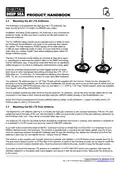
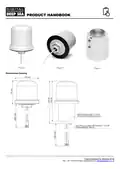
Mounting the 5GXtream GPS Antenna
The 5GXtream has a powerful GNSS (GPS+GLONASS+GAILEO)
receiver, which can provide position and timing data for logging and
geo-fencing. It is also possible to configure it to send this data to the
NMEA 2000 interface, but this is not enabled by default.
A small passive, adhesive backed, GPS antenna is supplied with 3m of
cable. It is designed for discrete mounting, inside the boat and should
be mounted close to a window or where there is just glass or GRP
between the antenna and the sky.
The SMA connector should be screwed into the GPS connector on the 5GXtream.
For installations that require an external GPS sensor, Digital Yacht can supply the MA800 antenna (Part/No X500.391)
which comes with 10m of cable and can be fitted on a standard 1”x14TPI thread VHF/GPS mounting bracket.
3.5
Power Requirements
The unit is designed to work on vessels with a 12V or 24V DC system (9-30V DC Input voltage). It should be wired to a 1
Amp fused or circuit breaker protected circuit and if connected to a higher amperage circuit, then a 1A in-line fuse should
be used to protect the 5GXtream wiring.
The 5GXtream has a two-core power cable with a Red (+) and Black (-) wire. Be very careful to ensure that the correct
supply voltage polarity is connected to the 5GXtream, as reverse polarity will damage the unit. Once connected to the
vessel’s 12v/24v DC system, do not apply power but continue with the installation steps below.
3.6
Network Connections
The 5GXtream has five RJ45 Ethernet connectors; 4x LAN and 1x WAN. If you wish to connect additional wired devices
to the 5GXtream’s local area network (LAN) such as a Smart TV, fixed mount computer, VOIP Phone, etc. then use a
conventional network cable to connect the devices to any of the 4x LAN sockets of the 5GXtream.
If you wish to connect another Ethernet based internet connection, such as StarLink, then this should be connected to the
5GXtream’s WAN socket using a conventional network cable.
If you are regularly visiting marinas with good Wi-Fi hotspots, then you may wish to add Digital Yacht’s Long Range WiFi
kit which can allow one of the 5GXtream’s wireless interfaces to connect to either a 2.4GHz or 5GHz wireless hotspot and
use that as its connection to the internet, rather than its own mobile 4G/5G connection.
The 5GXtream can be instructed to use its mobile connection, a wired WAN connection or a WiFi connection to access
the internet, via the units web interface, which is covered later in this manual.
3.7
Inserting a 5G/4G data SIM card
To connect to the internet, the 5GXtream must have a 5G/4G data SIM inserted which is registered to a valid mobile
operator account. Any mobile operator’s SIM can be used that is the Standard SIM (15 x 25mm) size.
The 5GXtream has two standard SIM slots and it is possible to fit two SIMs from two different network operators. You can
set SIM switching rules to decide which SIM is given preference i.e. No network, weak signal, data limit reached, etc.
To insert a SIM (Fig 7), remove the SIM extractor tool (1) and gently press the end of the tool into the hole to the right of
the SIM tray you wish to use. The tray will partially eject, and you can then pull the SIM tray out completely. Place the
Product Handbook for 5GXtream V1.00

| General | Details |
|---|---|
| Name | DIGITAL DEEP SEA 5G Xtream 5G/4G Router Instruction Manual |
| Make | DIGITAL DEEP SEA |
| Language | English |
| Filetype | PDF (Download) |
| File size | 0.45 MB |
 (1 votes, average: 5.00 out of 5)
 Loading...
If you have any questions regarding DIGITAL DEEP SEA 5G Xtream 5G/4G Router Instruction Manual, please ask here and describe the problem in detail.


HUAWEI EG8147X6-10 OptiXstar WiFi Router Instruction Manual

HERCULES HE042 Compact Trim Router Owner’s Manual

DrayTek V4.3.2.5 Vigor1000B Multi WAN Security Router User Guide

Tenda N301 Wi-Fi 4 Router Installation Guide

RuiJie Reyee RG-EW Series Router User Guide

D-Link DPN-BE7212GR Wi-Fi 7 Router Instruction Manual

intelbras WiFiber 121 AC Wi-Force Router User Manual
REPUBLIC OF GAMERS GT-BE19000 WiFi 7 Tri Band Gaming Router User Guide

Ruijie Reyee RG-EW1200 Dual-Band Wireless Router Installation Guide

ASKEY RT5035W Google Fiber Wi-Fi 6E Router User Guide