×
- 1. Airflow Measurement System (Bac-5051(a)e Router → Application Guide)
- 2. Getting Started (Prerequisites → Setting Up An Afms → Setting Afms Parameters → Calibrating The Afms's Sensors → Running Afms Learning Mode → Controlling Airflow With An Afms)
- 3. Getting Started (Prerequisites → Configure The Router And Set Up Routing → Accessing The Router's Afms Features)
- 4. Setting Up An Afms (Setting Afms Parameters → Calibrating The Afms's Sensors → Running Afms Learning Mode → Manually Entering Damper Characterization Data)
- 5. Setting Afms Parameters (Before Beginning → Setting The Parameters → Warning: On Is Recommended To Prevent Freezing Of Equipment. → Damper Reverse Action → Actuator Voltage → Learn Damper Span)
- 6. Learning Mode (Calibrating The Afms's Sensors)
- 7. Calibrating The Afms's Sensors (Offset For Supply Air Flow → Multiplier For Supply Air Flow → Offset For Outside Air Temp → Return Air Temp → Mixed Air Temp → Running Afms Learning Mode)
- 8. Runningafmslearningmode (Beforestartinglearningmode → Checkinglearnreadystatus → Interpretinglearnreadystatus → Enablinglearningmodetoautostart → Settingafmsparameters → Calibratingtheafms'ssensors)
- 9. Enabling Learning Mode To Auto Start (Manually Starting Learning Mode → Checking Learn Ready Status → Setting Afms Parameters → Interpreting Learn Ready Status)
- 10. Min Delta Temp (Auto Start Delta Temp → Time Between Samples (seconds) → Auto Learn Enable → Save → Alternative To Running Learning Mode → Manually Entering Damper Characterization Data)
- 11. Setting Up An Afms (Controlling Outside Air Flow → Controlling Mixed Air Temperature → Commanding A Damper Position)
- 12. Outside Air Damper Setpoint (Enable Low Limit → Control Mode → Enabling Pass Through → Airflow Measurement System Installation Guide → Warning: Enable Low Limit And Low Temp Limit Do Not Apply When In Pass Through → Afms Bac-5051(a)e Router Ag)
- 13. Monitoring With An Afms (Accessing Monitoring → Monitoring Operation → Monitoring Faults → Control Mode → Damper Control Fault → Outside Air Control Fault)
- 14. Controlling Mixed Air Temperature (Accessing The Damper Characterization Table → Setting Afms Parameters → Learning Mode → Mixed Air Flow Fault → Outside Air Flow Fault → Mixed Air Temp Low Limit)
- 15. Accessing The Damper Characterization Table (Manually Entering Damper Characterization Data → Setting Up An Afms → Accessing The Afms Table → Interpreting The Afms Table → Calculating The Damper Characterization Data)
- 16. Getting Started (Verifying The Damper Characterization Data → Manually Entering Damper Characterization Data → Controlling Airflow With An Afms → Monitoring With An Afms)
- 17. Important Notices (Trademarks → Patents → Terms Of Use → Copyright → Disclaimers → Specifications And Design Subject To Change Without Notice)
×
TRUEFIT BAC-5051A E Airflow Measurement System Router User Guide
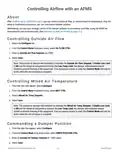
Note: The AFMS controller will command the damper to the Outside Air Damper Setpoint. If Enable Low
Limit is ON and the mixed air temperature reaches the Low Temp Limit, the damper will modulate toward
closed to prevent freezing of the equipment. If an occupancy sensor is used, this Control Mode will only be
active when the served space is occupied.
Enabling Pass Through
From the tabs that appear, select Configure.
From the Control Mode drop-down menu, select PASS THROUGH.
Select Save.
1.
2.
3.
Note: The external controller (if the AFMS controller is wired to one) will be allowed to control the damper
actuator. (For wiring details, see the Airflow Measurement System Installation Guide, found on any
AFMS controller's product page.) This Control Mode will only be active when Learn Damper Span and
Learning Mode (under the Learn tab) are OFF.
Warning: The Enable Low Limit and Low Temp Limit do not apply when in PASS THROUGH.
Ensure the external controller has its own low limit and other safeties configured to prevent
equipment damage.
AFMS BAC-5051(A)E Router AG
12
AG230818A
| General | Details |
|---|---|
| Name | TRUEFIT BAC-5051A E Airflow Measurement System Router User Guide |
| Make | TRUEFIT |
| Language | English |
| Filetype | PDF (Download) |
| File size | 0.2 MB |
If you have any questions regarding TRUEFIT BAC-5051A E Airflow Measurement System Router User Guide, please ask here and describe the problem in detail.


Hisense HBR6303M WiFi Router User Manual
trend Router Cutter Safety Instructions

REYEE RG-EG209GS 9-Port Gigabit Cloud Managed SFP Router User Manual

CP PLUS CP-XR-DE21-S 4G Router Installation Guide

NOKIA ONT G-1426G-A Dual Band Wi-Fi 6 Mesh Router User Guide

Xiaomi AX9000 Router User Manual

AntennaGear P5 5G Router Owner’s Manual

ZYXEL NETWORKS 2AU6R03993 Security Router User Guide

Cudy WR1200 AC1200 Dual Band Smart Wi-Fi Router Installation Guide

LANCOM 883+ VoIP Single Site Router Installation Guide
Table of Contents
- 1. Airflow Measurement System - Bac-5051(a)e Router →
- 2. Getting Started - Prerequisites →
- 3. Getting Started - Prerequisites →
- 4. Setting Up An Afms - Setting Afms Parameters →
- 5. Setting Afms Parameters - Before Beginning →
- 6. Learning Mode - Calibrating The Afms's Sensors →
- 7. Calibrating The Afms's Sensors - Offset For Supply Air Flow →
- 8. Runningafmslearningm... - Beforestartinglearni... →
- 9. Enabling Learning Mode To Auto Start - Manually Starting Lea... →
- 10. Min Delta Temp - Auto Start Delta Temp →
- 11. Setting Up An Afms - Controlling Outside Air Flow →
- 12. Outside Air Damper Setpoint - Enable Low Limit →
- 13. Monitoring With An Afms - Accessing Monitoring →
- 14. Controlling Mixed Air Temperature - Accessing The Damper Cha... →
- 15. Accessing The Damper Characterization Table - Manually Enter... →
- 16. Getting Started - Verifying The Damper Characterization Data →
- 17. Important Notices - Trademarks →