
Datto DSE641T 2×2 WiFi 6 Router User Guide


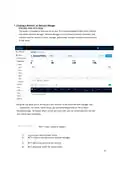

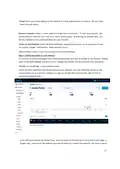








Disable Limited View: If unchecked, users will be able to see a limited view of the network
status. The password will still be required to change any network settings.
Email: Your email in case we need to contact you. We will not share this with others.
Notification Email: The email address notifications will be sent to if enabled. You can
list multiple email addresses, separated by spaces.
Email Alerts: Select this box to send notifications of network outages each hour to the
email addresses you entered above.
Network notes: Enter any unique notes for this installation you’d like to be able to
refer to later. Configure > SSID 1, 2, 3...
Each device can broadcast four unique SSIDs that users can connect to. Each of these
SSIDs are controlled independently in Network Manager. Typically users have a mix of
public SSIDs - with splash pages, bandwidth throttling, DNS filtering and client
isolation - and private SSIDs, with WPA Enterprise authentication and access to LAN
resources and other clients. When we created your network, we set the first SSID to
be public and the second SSID to be private, but you can adjust these any way you
wish.
We’ll go through most of the features you may want to enable or change. You can also
learn more about voucher access, pay networks and more by following the links at the
end of this document. Common Settings
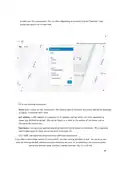
SSID name: The name you’d like users to see and connect to with their device. You
can also check the box below to use each access point’s name for its SSID instead.
Enable: When selected, this SSID will broadcast on all access points in this network.
When deselected, it won't broadcast but your settings will be saved.
Visible: When enabled, this SSID will advertise itself publicly so users can select it
from their list of available networks. When disabled, users must enter the SSID name
manually.
Band Use this to limit what bands the SSID is broadcast on. Note: Selecting the 'only'
options in a network with single radio devices (like the OM2P) may cause the SSID to
not be broadcast at all.
Authentication: Enable this to authenticate users with WPA-PSK or WPA-Enterprise at
the time they connect to the SSID. This isn't required if you wish to authenticate users
on a splash page.
WPA Pre-shared key (Password): If you would like to secure your network
with a password, enter it here. It must be eight characters or longer and
contain no spaces.
21

WPA Enterprise: Uses 802.1x authentication that requires a unique username
and password for each user.
Captive Portal Settings
Bandwidth Throttling: Enable and set download/upload limits to set the maximum
speeds users will get when connected to your network. You may want to set these to
between 10 and 25 per cent of the speed of your Internet connection, ensuring that
one or two users can’t consume the entire available bandwidth.
Splash Page/Splash Page Type: Enable or disable a page users will see before
connecting to your network. You can set this to Custom (hosted by Datto), Facebook
WiFi, or a hosted remotely version for advanced users.
Splash Page Authentication: Choose Network Manager, RADIUS or HTTP
Authentication. Read more here.
Client Force Timeout: Minutes client is idle (Idle Timeout) before showing splash page,
or minutes between showing splash page regardless of activity (Force Timeout) for
non-voucher access. 1 day=1440.
Require voucher: Require a valid voucher on splash pages. If unchecked, allows you to
provide a basic tier of service at the rates and durations above and (optionally) faster
service using vouchers or PayPal.
Redirect URL: The page to display after the splash page. Leave blank to display the
user’s requested page.
Include user data in redirect URL: If set, additional information specific to the
request is added as URL parameters when the final redirect occurs. The parameters
node mac, client_mac, and client_url will be set to the MAC addresses of the Access
Point and Client, and the original request URL, respectively.
Block Unauthenticated Users: Block all ports until a client device has been
authenticated. If unchecked, only browsing is blocked. When selected,
unauthenticated users trying to access https websites will not be redirected to the
splash page.
White List: MAC addresses, one per line that will NOT see the splash page, if enabled.
Useful for game consoles that do not have a browser.
Walled Garden: Sites and resources (images and files for the splash page, etc.) users
can visit prior to authentication. Blocked Devices MAC addresses that are blocked
from this network.
Blocked Message Message to display on the splash page to users who are blocked
22

| General | Details |
|---|---|
| Name | Datto DSE641T 2×2 WiFi 6 Router User Guide |
| Make | datto |
| Language | English |
| Filetype | PDF (Download) |
| File size | 0.7 MB |
 (1 votes, average: 5.00 out of 5)
 Loading...
If you have any questions regarding Datto DSE641T 2×2 WiFi 6 Router User Guide, please ask here and describe the problem in detail.


Cudy LT500D Dual Band Unlocked 4G LTE Modem Router Installation Guide

D-Link DIR-615 Wireless Router User Manual

robustel R3000 Lite Dual-SIM VPN Router User Manual

ASUS RP-AX56 Dual Band Wireless Router User Guide

Tenda TX2L ProV1.0 WiFi 6 Router Installation Guide

JUNIPER SSR1400 Session Router User Guide

NETGEAR BE17000 Nighthawk WiFi 7 Tri-Band Router Owner’s Manual

CEDARouter C3 5G Aggregation Router User Guide

more BYO Router Installation Guide

DrayTek VDSL2 Security Router User Guide