
Datto DSE641T 2×2 WiFi 6 Router User Guide


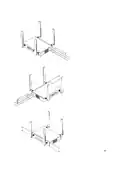
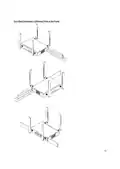









6. Mounting and Installation Instructions
This Appliance is designed to be installed in several mounting positions. Regardless of how you mount this
appliance, keep the following in mind:
-
-
Caution
Ensure that Protective earth grounding is available for the device:
o
o
Power Supply Cord shall be connected to a socket-outlet with earthing connection
Using the factory supplied Grounding screw, mount an appropriately sized grounding wire from
that grounding point on the chassis to a good earth ground.
-
-
-
-
Place in the center of the room and away from any metallic surfaces
Signal primarily radiated to the front and sides, there is limited signal coverage directly behind it
Do not place heavy objects on the Appliance
Install in an area that is free from strong electromagnetic sources
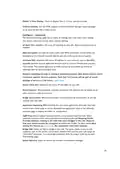
Step 1, Connect WiFi and LTE antennas
7

| General | Details |
|---|---|
| Name | Datto DSE641T 2×2 WiFi 6 Router User Guide |
| Make | datto |
| Language | English |
| Filetype | PDF (Download) |
| File size | 0.7 MB |
 (1 votes, average: 5.00 out of 5)
 Loading...
If you have any questions regarding Datto DSE641T 2×2 WiFi 6 Router User Guide, please ask here and describe the problem in detail.


Cudy LT500 Outdoor 4G WiFi Router Installation Guide

MAXVIEW Roam 5G WiFi Router User Guide

PHILIPS PH-001 LTE Mi-Fi Router User Manual

Cudy TR3000 AX3000 2.5G Wi-Fi 6 Mini VPN Router Installation Guide

Beijer CloudVPN Gateway Router User Guide

Mercury Asus RT-AC66-88U Fiber Dual-Band Wireless AC1750 Gigabit Router User Guide

ASUS RT-AXE7800 Wireless AXE7800 Tri Band Gigabit Router User Guide

NETGEAR BE9200 WiFi 7 Router Instruction Manual

IMOU AX3000 Wi-Fi 6 Router User Guide

Rebel RB-0701 4G LTE Router Owner’s Manual