
Home > DIGITAL YACHT > Digital Yacht NeXuX Connect WiFi Router Installation Guide
Digital Yacht NeXuX Connect WiFi Router Installation Guide








4. Configuration
Assuming your wireless device sees the “NeXuX Connect” network, join it using the default wireless password, shown
below. Once connected, your device should automatically get an IP address, via DHCP, in the 192.168.1.xxx range.
Wireless Password = NeXuXConnect
Many operating systems, including iOS and Android, will complain about the connection saying “No Internet Connection”.
This is perfectly normal and indicates that the 4G connection is not setup yet. As soon as the SIM card is inserted and
configured (if necessary) this warning should disappear.
In addition, Apple have recently started warning about “Weak Security” on WPA and WPA2 encrypted wireless networks.
However, NeXuX Connect supports the latest WPA3 encryption and by default we enable “WPA2 and WPA3 Mixed Mode”
so that new devices that support WPA3 and older devices that only support WPA2 can both join the same network.
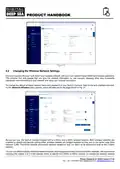
You should now be able to type either http://nexuxconnect.lan or http://192.168.1.1 in to the address bar of your browser
and see the NeXuX Connect login page appear (see Fig 8). Make sure you use the http:// pre-fix or your browser may try
to do a web search.
Figure 8
Now login to the NeXuX Connect by entering the default login password as below…
Username = admin
Password = NeXuXConnect
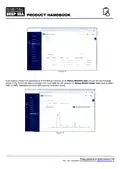
Once logged in you will be taken to the main Overview Page as shown in Fig.6.
This page provides a “Dashboard” showing the status of the NeXuX Connect’s network connections and settings. From this
page, you can access the main menu bar down the left side of the page which will take you to various status, configuration,
tools and services menus. The default NeXuX Connect settings have been carefully chosen to work well in most
situations/installations, commonly found on marine vessels.
Digital Yacht strongly recommend that you do not change any settings except those specifically
mentioned in this manual and we cannot support or warranty repair any NeXuX Connect that fails due to
wrong settings
Product Handbook for NeXuX Connect V1.00


| General | Details |
|---|---|
| Name | Digital Yacht NeXuX Connect WiFi Router Installation Guide |
| Make | DIGITAL YACHT |
| Language | English |
| Filetype | PDF (Download) |
| File size | 0.3 MB |
 (1 votes, average: 5.00 out of 5)
 Loading...
If you have any questions regarding Digital Yacht NeXuX Connect WiFi Router Installation Guide, please ask here and describe the problem in detail.

DIGITAL YACHT 4GXtream NMEA 2000 3G or 4G Router Instruction Manual

DIGITAL YACHT 4GXtream NMEA 0183 3G or 4G Router Instruction Manual

DIGITAL YACHT Littoral Link 4G Router Instruction Manual


ASUS BT6 Tri Band WiFi Router User Guide

Taiko Audio V16.x22069 Extreme Router User Manual

TP-Link NE200 Outdoor Router Installation Guide
evolution DIGITAL SG0006D2VA GPON WiFi6 Mesh Router Installation Guide

motorola Cable Modem Plus N450 Router User Guide

TAIKO AUDIO ES9039MSPRO Extreme Switch Router Instruction Manual

WiFi SKY M0305405 Wireless Router Installation Guide

GLiNet MT6000 Wireless Router User Guide

ZYXEL EX5601 Hyperhub Router User Guide

ZYXEL NETWORKS 2AU6R03993 Security Router User Guide