
Home > DIGITAL YACHT > Digital Yacht NeXuX Connect WiFi Router Installation Guide
Digital Yacht NeXuX Connect WiFi Router Installation Guide








It is also possible to use one of the NeXuX Connect’s wireless interfaces as an Internet connection, by switching it to
STATION mode and connecting it to a public hotspot such as you find in marinas.
We recommend our optional Long Range WiFi kit which can be connected in place of one of the two internal WiFi
antennas and which increases the range of the WiFi signal.
5. Normal Operation
The NeXuX Connect will always create its own wireless network within 50-60 seconds of being powered up and any wireless
device should be able to scan for wireless networks, select the NeXuX Connect and connect to it.
Assuming you are within 5G/4G coverage, then any device connected to the NeXuX Connect wireless network, or wired to
one of the LAN sockets should be able to access the internet. If you are using a “Pay As You Go” SIM or “Pay Monthly”
SIM with a monthly data limit (recommended), please ensure you have not used up all of your data allowance.
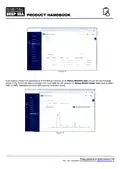
To check that you have a good 5G/4G mobile data connection to the internet, go to the main Status>Overview page and
look at the “Internal Modem” panel where you should have a good signal strength shown on the Bar meter and Data
Connection should say “Connected”.
If you have good signal strength, the Data Connection says “Connected”, then you should be online and be able to browse
the internet, get email, stream movies, etc.
Figure 17
Sometimes, it is useful to know what devices are on the network and what their IP address is. You can view a list of all
devices that have received an IP Address from the NeXuX Connect via DHCP.
To access the DHCP Client List, go to Status>Network>LAN and you will see the page shown in Figure 18. Please note
that this NeXuX Connect was using a different 192.168.42.xxx IP address range, than the default NeXuX Connect range
which is 192.168.1.xxx.
Product Handbook for NeXuX Connect V1.00

| General | Details |
|---|---|
| Name | Digital Yacht NeXuX Connect WiFi Router Installation Guide |
| Make | DIGITAL YACHT |
| Language | English |
| Filetype | PDF (Download) |
| File size | 0.3 MB |
 (1 votes, average: 5.00 out of 5)
 Loading...
If you have any questions regarding Digital Yacht NeXuX Connect WiFi Router Installation Guide, please ask here and describe the problem in detail.

DIGITAL YACHT 4GXtream NMEA 2000 3G or 4G Router Instruction Manual

DIGITAL YACHT 4GXtream NMEA 0183 3G or 4G Router Instruction Manual

DIGITAL YACHT Littoral Link 4G Router Instruction Manual


NEXTIVITY SHIELD MegaFi 2 Fixed Wi-Fi 6 Mobile Router User Guide

EnGenius XG60-FIT FitXpress 4 port Gigabit PoE plus VPV Router Owner’s Manual

TP-Link ER707-M2 Omada Multi-Gigabit VPN Router Installation Guide

acer WA-36W12FU-AKAA 6E Predator Connect W6 Wi-Fi Router User Manual

TP-Link ER7212PC Omada 3-in-1 Gigabit VPN Router Owner’s Manual

GOST VG5-CG Multi Carrier Select Router User Guide

TELTONIKA Networks RUT241 LTE Router User Guide

DrayTek 2620 Series LTE Router User Guide

Teltonika RUT241 LTE Router Owner’s Manual

Cudy X6 AX1800 1800mbps Dual Band Wi-Fi 6 Router Installation Guide