
COBALT WAVE RTR-64×64 Router User Manual







Operating Instructions
Control and Display Descriptions
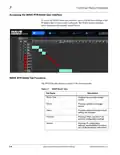
Router Table Tab
The Router Table tab provides a visual representation of the currently loaded
salvo. The source inputs are located on the right of the table and the
destination outputs are located at the top.
From the router table you can:
•
•
View each connected route.
View the RP-168 reference input status (Reference Input). The
status will display the kind of signal feeding the router from a source.
•
View the input signal type (Input Status). Examples include 3G, 12G
and MADI. A loss of signal is displayed in a red shaded square with
the label of LOS.
WAVE RTR-64x64-OM (V1.1)
WAVE 64X64-RTR ROUTER PRODUCT MANUAL
3-5

| General | Details |
|---|---|
| Name | COBALT WAVE RTR-64×64 Router User Manual |
| Make | worCOBALT |
| Language | English |
| Filetype | PDF (Download) |
| File size | 1.03 MB |
 (1 votes, average: 5.00 out of 5)
 Loading...
If you have any questions regarding COBALT WAVE RTR-64×64 Router User Manual, please ask here and describe the problem in detail.


COWMANAGER WIB2000 Coordinator Router User Manual

KAON BROADBAND AR2340G Wi-Fi Router Installation Guide

NETGEAR R6700AX Wi-Fi 6 Router Instructions

ASUS RT-BE88U Dual Mand WiFi 7 AiMesh Extendable Performance Router Instructions

robustel R5020 5G WiFi Wireless Router Owner’s Manual

Harvilon MF302 4G LTE Wi-Fi Router User Guide

xunison Hub M50 Mesh Tower High Performance Router User Guide

TP-Link Archer MR600 Wireless 4G LTE Router Installation Guide

ATEL RE600 5G CPE Router User Guide

NETGEAR RS280 Nighthawk Tri-Band WiFi Router User Guide