
COBALT WAVE RTR-64×64 Router User Manual







3
Control and Display Descriptions
Settings Tab
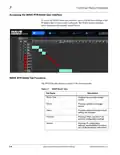
The Settings tab provides options to view and configure various settings.
Specifically, it includes an information section, options to configure IP
settings, and a section that provides administration options.
About
The About section contain the following information:
Product Name
Company Name
Software Revision (Platform)
Hardware Revision
Tempe Zone (C or F)
Software Revision (Neo)
Serial Number
CPU temperature
Switch Matrix dimensions (Top Right/
Top Left/Bottom Right/Bottom)
LED Status: Provides the following
status conditions:
RED: Service affecting error
Blue: A setting has been changed, but
not yet saved in Autosave. NOTE: After
settings have been made and the
system has been idle, then the settings
are save in the internal FLASH after 30
seconds.
Green: All systems are normal
Power supply LEDs (PS-1 and 2) - Blue
(On) Power good, Gray (Off) No power
3-16
WAVE 64X64-RTR ROUTER PRODUCT MANUAL
WAVE RTR-64x64-OM (V1.1)

| General | Details |
|---|---|
| Name | COBALT WAVE RTR-64×64 Router User Manual |
| Make | worCOBALT |
| Language | English |
| Filetype | PDF (Download) |
| File size | 1.03 MB |
 (1 votes, average: 5.00 out of 5)
 Loading...
If you have any questions regarding COBALT WAVE RTR-64×64 Router User Manual, please ask here and describe the problem in detail.


ASUS RT-ACRH18 Dual band AC WiFi Router User Guide
FAQs TAP0016 Taiko Audio Extreme Router User Manual

devolo Giga Bridge Connecting ONT and Router Installation Guide

D-Link G415 AX1500 4G Router User Guide

Juniper ACX7509 Cloud Metro Router User Guide

ime RUTM10 Router Instruction Manual

Touch Controls ER-B-10-100-120 Ethernet Router Instruction Manual

Cudy WR3600 Wi-Fi 7 Router Installation Guide

HUAWEI 31500DHA_01 5G CPE Pro 2 WiFi 6 Router User Guide

Amped Wireless R10000 High Power Wireless N 600mW Router User Guide