
COBALT WAVE RTR-64×64 Router User Manual







3
Control and Display Descriptions
•
Set the input mode to automatically detect all video modes except
MADI or to force the input to detect MADI. When MADI is elected,
other video modes are not detected; the Input Status will only display
MADI or LOS. Select the desired item from the pull-down menu.
•
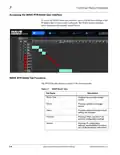
Edit source and destination names by clicking on the desired input or
destination output. By default, sources are named SOURCE-1
through SOURCE-64 and destinations are named DEST-1 through
DEST-64. Clicking on the desired source input expands the entire
column allowing you to rename the source. Clicking on the desired
destination output expands only the selected destination.
•
Reroute an existing route by clicking on the desired source/
destination location.
3-6
WAVE 64X64-RTR ROUTER PRODUCT MANUAL
WAVE RTR-64x64-OM (V1.1)

| General | Details |
|---|---|
| Name | COBALT WAVE RTR-64×64 Router User Manual |
| Make | worCOBALT |
| Language | English |
| Filetype | PDF (Download) |
| File size | 1.03 MB |
 (1 votes, average: 5.00 out of 5)
 Loading...
If you have any questions regarding COBALT WAVE RTR-64×64 Router User Manual, please ask here and describe the problem in detail.


TP-Link TL-WR940N Wireless N Router Installation Guide

BEC AirConnect 8112 5G Enterprise Router User Guide

Gemma Group Flex L Copy Router User Guide

Yifan YF325 4G Router User Guide

LOGIC ML8 4G MiFi Router User Manual

HUAWEI 5G CPE Pro 2 WiFi 6 Router User Guide

COOSPO RC905 Router User Manual

ASUS RT-AX58U AX3000 Dual Band Wi-Fi Router User Guide

TP-Link RJ45 Modem Router Owner’s Manual

TP-Link Archer AX55 Pro AX3000 Multi-Gigabit Wi-Fi 6 Router Installation Guide