
GEWISS GW A9707 KNX/IP Router Installation Guide



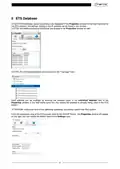





The IP card shows the network settings of the device. Changing from “Obtain an IP address automatically” to
“Use a static IP address” activates the fields for setting the IP address, the network sub-mask and the
predefined gateway.
ATTENTION: modifications made in the Properties window will only become effective after downloading the
ETS application of the KNX/IP Router.
5.1 IP Address
Key in the IP address of the KNX/IP Router. This is used to address the device in the IP (LAN) network. The
assignment of the IP address should be managed by the network administrator.
5.2 Subnet Mask
Key in the network sub-mask. The device uses the mask to determine whether there is a communication
partner in the local network. If there are no partners in the local network, the device sends the telegrams to
the predefined gateway which then re-routes them to the other sub-networks.
5.3 Default Gateway
Key in the predefined gateway address (e.g. the address of the system DSL router).
5.4 Example of IP address assignment
A PC is used to connect to the KNX/IP Router:
IP address of the PC:
Sub-network mask of the PC:
192.168.1.30
255.255.255.0
The KNX/IP Router is in the same local LAN network as the PC; this means it has the same sub-network
mask. The sub-network binds the IP addresses that can be assigned; in this example, the IP address of the
KNX/IP Router must be 192.168.1.xx, where "xx" is a value between 1 and 254 (excluding the value 30,
which has already been assigned to the PC). It is important to make sure the same value is not assigned
twice.
IP address of the KNX/IP Router:
Sub-network mask of the KNX/IP Router:
192.168.1.31
255.255.255.0
9

| General | Details |
|---|---|
| Name | GEWISS GW A9707 KNX/IP Router Installation Guide |
| Make | GEWiSS |
| Language | English |
| Filetype | PDF (Download) |
| File size | 0.38 MB |
 (1 votes, average: 5.00 out of 5)
 Loading...
If you have any questions regarding GEWISS GW A9707 KNX/IP Router Installation Guide, please ask here and describe the problem in detail.


GRANDSTREAM HT812 Powerful 2 Port ATA with Gigabit NAT Router User Guide

AmpliFi AFi-INS-R Instant Router User Guide

Juniper NETWORKS PTX10004 Ultra-Compact Modular Router User Guide

LINKSYS AX1800 Dual-Band WiFi 6 Router E7350 User Guide

TP-Link BE450 Dual Band Wi-Fi 7 Router Installation Guide

ASUS ExpertWiFi EBG15 Gigabit VPN Router User Guide

TP-Link Archer AC1900 MU MIMO Wi-Fi Router Installation Guide

NETGEAR BE17000 Nighthawk WiFi 7 Tri-Band Router Owner’s Manual

ASUS AX7800 Tri Band WiFi Router User Guide

Fiberhome Telecommunication Technologies Co Ltd SR1021F Wireless Router User Manual