
GEWISS GW A9707 KNX/IP Router Installation Guide



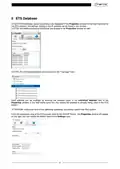





2.2 BUS ACCESS INTERFACE function
The KNX/IP Router can be used to access the KNX BUS from any point of the LAN network; for this reason,
it requires a second address (network address), as described in the Interface settings with ETS menu.
ATTENTION! Remote access via NAT, without additional security measures, poses significant
dangers. Port forwarding provides universal access to your local IP network and to your KNX
system. Any Internet user can discover the open port on your static public IP address and can, for
example, access your KNX network via the ETS software.
Use NAT only temporarily for testing or diagnostic purposes. Afterwards, close the port again to avoid cyber
attacks.
If remote access is realized through NAT, it is highly recommended that you do not specify the default port
3671 towards the Internet. Port 3671 is the official port for efcp - eFieldControl (EIBnet) registered by KNX
Association. This port can easily be easily determined by unauthorized people. Please use a port in the non-
reserved range between port 50000 and port 60000.
Permanent remote access should be established only when protected! Remote access via Virtual Private
Network (VPN) is recommended. The VPN feature is already integrated into most DSL routers.
Setting a password for the ETS project can also help prevent malicious manipulation of devices.
To always guarantee the correct level of security in KNX installations, consult the KNX-Security-Checklist-
3 Installation and connection
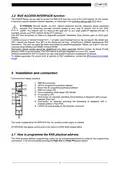
Command and display elements:
1. KNX BUS terminals
2. LED for programming physical address
3. Button key for programming physical address
4. KNX line status LED
5. Device operating mode status LED (Mode)
6. IP line status LED
7. Push-button for manually activating the forwarding of telegrams with a group
address (Pass GA)
8. Push-button for manually activating the forwarding of telegrams with a
physical address (Pass PhA)
9. LAN RJ-45 socket-outlet for the Ethernet connection.
The router is powered by the KNX BUS line. No auxiliary power supply is needed.
ATTENTION: the device cannot work in the event of a KNX BUS voltage failure.
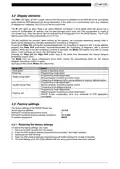
3.1 How to programme the KNX physical address
The KNX physical address programming mode can be activated/deactivated by pressing the programming
push-button, or by simultaneously pressing the Pass GA and Pass PhA push-buttons.
5

| General | Details |
|---|---|
| Name | GEWISS GW A9707 KNX/IP Router Installation Guide |
| Make | GEWiSS |
| Language | English |
| Filetype | PDF (Download) |
| File size | 0.38 MB |
 (1 votes, average: 5.00 out of 5)
 Loading...
If you have any questions regarding GEWISS GW A9707 KNX/IP Router Installation Guide, please ask here and describe the problem in detail.


LANCOM 884 VoIP Router User Guide

JUNIPER SSR1400 Session Smart Router User Guide

ARRIS G34 Multi Gigabit Cable Modem and Wi-Fi Router User Guide

UBIQUITI ER-X-SFP Edge Router User Guide

GearUp HYPEREV WH01 Wireless Router User Guide

cradlepoint PepWave MAX BR1 Pro 5G Mobile Router User Guide

ADTRAN 1200824G1 Netvanta 3458 Access Router User Guide

BEC 7000 R26-W Gigabit LTE Outdoor Router with Hotspot User Guide

BUFFALO WZR2-G300N Wireless Router User Guide

ASUS ZenWiFi Pro ET12 AXE11000 Tri Band Router User Guide