
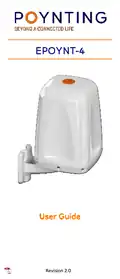
POYNTING EPOYNT-4 Outdoor LTE-5G Antenna and Router Enclosure User Guide





•
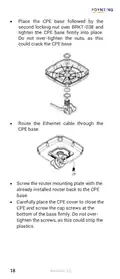
Place the CPE base followed by the
second locking nut over BRKT-038 and
tighten the CPE base firmly into place.
Do not over-tighten the nuts, as this
could crack the CPE base.
•
Route the Ethernet cable through the
CPE base.
•
•
Screw the router mounting plate with the
already installed router back to the CPE
base.
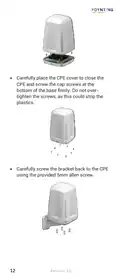
Carefully place the CPE cover to close the
CPE and screw the cap screws at the
bottom of the base firmly. Do not over-
tighten the screws, as this could strip the
plastics.
18
Revision 2.0

| General | Details |
|---|---|
| Name | POYNTING EPOYNT-4 Outdoor LTE-5G Antenna and Router Enclosure User Guide |
| Make | Poynting |
| Language | English |
| Filetype | PDF (Download) |
| File size | 0.31 MB |
 (1 votes, average: 5.00 out of 5)
 Loading...
If you have any questions regarding POYNTING EPOYNT-4 Outdoor LTE-5G Antenna and Router Enclosure User Guide, please ask here and describe the problem in detail.


ZTE E3330 WiFi 6 Wireless Router User Manual

HUAWEI 5G CPE Pro 2 WiFi 6 Router User Guide

D-Link N300 EAGLE PRO AI N300 4G Router User Guide

peplink P1MT08 MAX BR1 Classic Automatic Failover 4G LTE Mobile Router User Manual

Woodpeckers Multi Router Instruction Manual

ASUS AX3000 Dual Band Wi-Fi Router RT-AX58U User Guide

Hongdian H8922 3G/4G Router User Guide

ASUS TUF-AX6000 Dual Band Wi-Fi Router User Guide

DrayTek Vigor2766 Series Fast Security Router User Guide

STRONG 4GROUTER300M 4G LTE Router Instruction Manual