
POYNTING EPOYNT-4 Outdoor LTE-5G Antenna and Router Enclosure User Guide





•
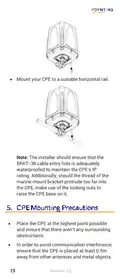
Mount your CPE to a suitable horizontal rail.
Note: The installer should ensure that the
BRKT-38 cable entry hole is adequately
waterproofed to maintain the CPE’s IP
rating. Additionally, should the thread of the
marine mount bracket protrude too far into
the CPE, make use of the locking nuts to
raise the CPE base on it.
•
Place the CPE at the highest point possible
and ensure that there aren't any surrounding
obstructions.
•
In order to avoid communication interference,
ensure that the CPE is placed at least 0.5m
away from other antennas and metal objects.
19
Revision 2.0

| General | Details |
|---|---|
| Name | POYNTING EPOYNT-4 Outdoor LTE-5G Antenna and Router Enclosure User Guide |
| Make | Poynting |
| Language | English |
| Filetype | PDF (Download) |
| File size | 0.31 MB |
 (1 votes, average: 5.00 out of 5)
 Loading...
If you have any questions regarding POYNTING EPOYNT-4 Outdoor LTE-5G Antenna and Router Enclosure User Guide, please ask here and describe the problem in detail.


NETGEAR RAXE500 WiFi 6E Router User Guide

ASUS RT-AX68U WiFi 6 Router User Guide

Ruijie 42301 Dual Band Gigabit Wireless Router Installation Guide

aparian A-DH485R/B Router User Guide
Isage VU202R Portable Small Wireless Router Instructions

Cudy LT700 LTE Router Installation Guide

Cudy LT15E 4G Cat 12 AX3000 Wi-Fi 6 Router Installation Guide

Tenda RX2 Pro Dual Band WiFi 6 Router Installation Guide

Danone CPF101 4G Router User Manual

ASUS BT8 ZenWiFi Tri Band WiFi Router User Guide