×
- 1.
- 2.
- 3. Packingchecklist (Settingupthecpe → Cpemountingconfigurations → Cpemounting → Precautions → Cablerouting → Safety)
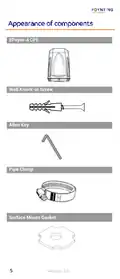
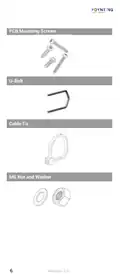
- 4. Item Description (Epoynt-4 Cpe Only → Quantity → Wall Knock-in → Screws → Mm Allen Key → Mm Allen Key → Pipe Clamp → Surface Mount → Gasket → M6 X 90mm Stainless → Steel U-bolts)
- 5. Epoynt-4 Cpe (Wall Knock-in Screw → Allen Key → Pipe Clamp → Surface Mount Gasket)
- 6. Pcb Mounting Screws (U-bolt → M6 Nut And Washer)
- 7. The Html Code Does Not Contain Any Subheadings Related To Installation/setup/configuration. Therefore, I Will Take The First Sentence From T… (Mm Masonry Drill Bit Impact Drilling Machine Hammer Safety Goggles Screwdriver Cross Slot/philips 7 Revision 2.0)
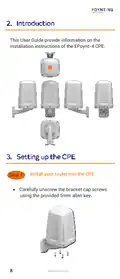
- 8. Installation Instructions Of The Epoynt-4 Cpe (Install Your Router Into The Cpe)
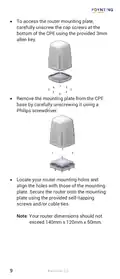
- 9. To Access The Router Mounting Plate, Carefully Unscrew The Cap Screws At The Bottom Of The Cpe Using The Provided 3mm Allen Key.
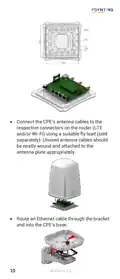
- 10. Connect The Cpes Antenna Cables To The Respective Connectors On The Router (Route An Ethernet Cable Through The Bracket And Into The Cpes Base)
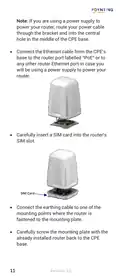
- 11. Connect The Ethernet Cable From The Cpes Base To The Router Port Labelled 'poe' (Carefully Insert A Sim Card Into The Routers Sim Slot → Connect The Earthing Cable To One Of The Mounting Points → Carefully Screw The Mounting Plate With The Already Installed Router Back To The Cpe Base)
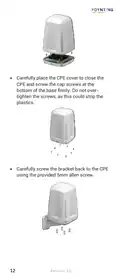
- 12. Carefully Place The Cpe Cover To Close The Cpe And Screw The Cap Screws At The Bottom Of The Base Firmly. Do Not Over-tighten The Screws, As…
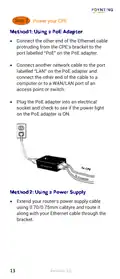
- 13. Power Your Cpe
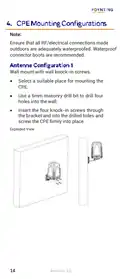
- 14. Ensure Waterproofing Of Rf/electrical Connections (Wall Mount Installation Instructions → Selecting A Suitable Mounting Location → Drilling Holes For Installation → Securing The Cpe With Screws)
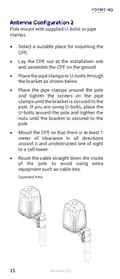
- 15. Pole Mount With Supplied U-bolts Or Pipe Clamps (Select A Suitable Place For Mounting The Cpe → Lay The Cpe Out At The Installation Site And Assemble The Cpe On The Ground → Mount The Cpe So That There Is At Least 1 Meter Of Clearance In All Directions → Route The Cable Straight Down The Inside Of The Pole To Avoid Using Extra Equipment Such As Cable Ties)
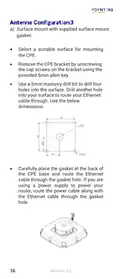
- 16. Surface Mount With Supplied Surface Mount Gasket (Select A Suitable Surface For Mounting The Cpe → Remove The Cpe Bracket → Drill Holes Into The Surface → Route Your Ethernet Cable Through The Gasket Hole → Use A Power Supply To Power Your Router)
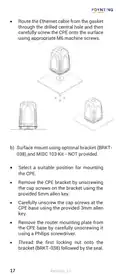
- 17. Route The Ethernet Cable (Surface Mount Using Optional Bracket → Select A Suitable Position For Mounting The Cpe → Remove The Cpe Bracket → Carefully Unscrew The Cap Screws At The Cpe Base → Remove The Router Mounting Plate From The Cpe Base → Thread The First Locking Nut Onto The Bracket)
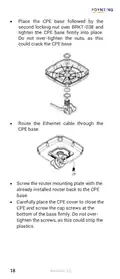
- 18. Place The Cpe Base (Route The Ethernet Cable → Screw The Router Mounting Plate → Carefully Place The Cpe Cover)
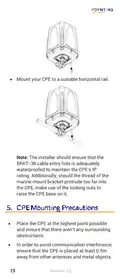
- 19. Mount Your Cpe To A Suitable Horizontal Rail. (Place The Cpe At The Highest Point Possible. → Ensure That The Cpe Is Placed At Least 0.5m Away From Other Antennas And Metal Objects.)
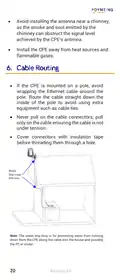
- 20. Avoid Installing The Antenna Near A Chimney (Install The Cpe Away From Heat Sources And Flammable Gases → If The Cpe Is Mounted On A Pole, Avoid Wrapping The Ethernet Cable Around The Pole → Never Pull On The Cable Connectors → Cover Connectors With Insulation Tape Before Threading Them Through A Hole → Water Drip Loop For Preventing Water From Running Down The Cable)
- 21. Installation Considerations (Safety Precautions → Professional Installation Assistance → Site Survey Before Installation → Weather Conditions For Installation → Personal Protective Equipment → Avoiding Distractions During Installation)
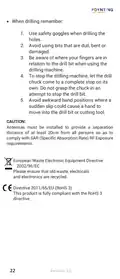
- 22. Use Safety Goggles When Drilling (Avoid Using Bits That Are Dull, Bent Or Damaged → Be Aware Of Where Your Fingers Are In Relation To The Drill Bit → To Stop The Drilling Machine, Let The Drill Chuck Come To A Complete Stop → Avoid Awkward Hand Positions → Antennas Must Be Installed To Provide A Separation Distance Of At Least 20cm From All Persons → Please Ensure That Old Waste, Electricals And Electronics Are Recycled)
- 23. Cpe Does Not Power On (Problems Logging Into The Router's Web Management Page)
- 24.
×
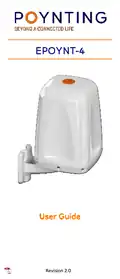
POYNTING EPOYNT-4 Outdoor LTE-5G Antenna and Router Enclosure User Guide
| General | Details |
|---|---|
| Name | POYNTING EPOYNT-4 Outdoor LTE-5G Antenna and Router Enclosure User Guide |
| Make | Poynting |
| Language | English |
| Filetype | PDF (Download) |
| File size | 0.31 MB |
If you have any questions regarding POYNTING EPOYNT-4 Outdoor LTE-5G Antenna and Router Enclosure User Guide, please ask here and describe the problem in detail.


Superbox S3PRO Router User Guide
Cudy WR3000 AX3000 Wi-Fi 6 Mesh Router User Guide

LEAX ARKIVATOR TELECOM LCE4121S Mesh Router User Manual

TP-Link Omada Gigabit VPN Router ER605 Installation Guide

Ruijie E4 Networking Router Instruction Manual

Cudy LT500D Dual Band Unlocked 4G LTE Modem Router Installation Guide
WALLYS DR5018 Router Board User Manual

KMC CONTROLS Conquest BAC-5051AE BACnet Router Instruction Manual

ATEL WB550 Apex 5G CPE Router Owner’s Manual

Red Fox 2 CNC Router Installation Guide
Table of Contents
- 1. Page 1 →
- 2. Page 2 →
- 3. Packingchecklist - Settingupthecpe →
- 4. Item Description - Epoynt-4 Cpe Only →
- 5. Epoynt-4 Cpe - Wall Knock-in Screw →
- 6. Pcb Mounting Screws - U-bolt →
- 7. The Html Code Does Not Contain Any Subheadings Related To In... →
- 8. Installation Instructions Of The Epoynt-4 Cpe - Install Your... →
- 9. To Access The Router Mounting Plate, Carefully Unscrew The C... →
- 10. Connect The Cpes Antenna Cables To The Respective Connectors... →
- 11. Connect The Ethernet Cable From The Cpes Base To The Router ... →
- 12. Carefully Place The Cpe Cover To Close The Cpe And Screw The... →
- 13. Power Your Cpe →
- 14. Ensure Waterproofing Of Rf/electrical Connections - Wall Mou... →
- 15. Pole Mount With Supplied U-bolts Or Pipe Clamps - Select A S... →
- 16. Surface Mount With Supplied Surface Mount Gasket - Select A ... →
- 17. Route The Ethernet Cable - Surface Mount Using Optional Brac... →
- 18. Place The Cpe Base - Route The Ethernet Cable →
- 19. Mount Your Cpe To A Suitable Horizontal Rail. - Place The Cp... →
- 20. Avoid Installing The Antenna Near A Chimney - Install The Cp... →
- 21. Installation Considerations - Safety Precautions →
- 22. Use Safety Goggles When Drilling - Avoid Using Bits That Are... →
- 23. Cpe Does Not Power On - Problems Logging Into The Router's W... →
- 24. Page 24 →