×
- 1.
- 2.
- 3. Packingchecklist (Settingupthecpe → Cpemountingconfigurations → Cpemounting → Precautions → Cablerouting → Safety)
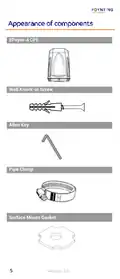
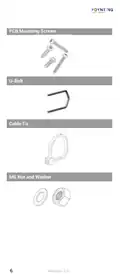
- 4. Item Description (Epoynt-4 Cpe Only → Quantity → Wall Knock-in → Screws → Mm Allen Key → Mm Allen Key → Pipe Clamp → Surface Mount → Gasket → M6 X 90mm Stainless → Steel U-bolts)
- 5. Epoynt-4 Cpe (Wall Knock-in Screw → Allen Key → Pipe Clamp → Surface Mount Gasket)
- 6. Pcb Mounting Screws (U-bolt → M6 Nut And Washer)
- 7. The Html Code Does Not Contain Any Subheadings Related To Installation/setup/configuration. Therefore, I Will Take The First Sentence From T… (Mm Masonry Drill Bit Impact Drilling Machine Hammer Safety Goggles Screwdriver Cross Slot/philips 7 Revision 2.0)
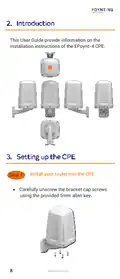
- 8. Installation Instructions Of The Epoynt-4 Cpe (Install Your Router Into The Cpe)
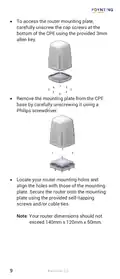
- 9. To Access The Router Mounting Plate, Carefully Unscrew The Cap Screws At The Bottom Of The Cpe Using The Provided 3mm Allen Key.
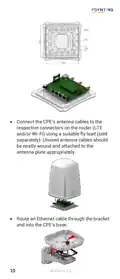
- 10. Connect The Cpes Antenna Cables To The Respective Connectors On The Router (Route An Ethernet Cable Through The Bracket And Into The Cpes Base)
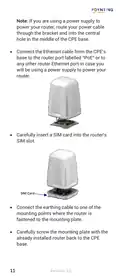
- 11. Connect The Ethernet Cable From The Cpes Base To The Router Port Labelled 'poe' (Carefully Insert A Sim Card Into The Routers Sim Slot → Connect The Earthing Cable To One Of The Mounting Points → Carefully Screw The Mounting Plate With The Already Installed Router Back To The Cpe Base)
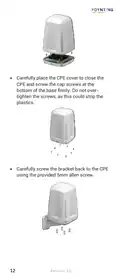
- 12. Carefully Place The Cpe Cover To Close The Cpe And Screw The Cap Screws At The Bottom Of The Base Firmly. Do Not Over-tighten The Screws, As…
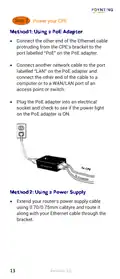
- 13. Power Your Cpe
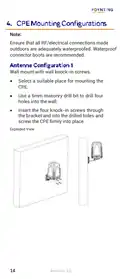
- 14. Ensure Waterproofing Of Rf/electrical Connections (Wall Mount Installation Instructions → Selecting A Suitable Mounting Location → Drilling Holes For Installation → Securing The Cpe With Screws)
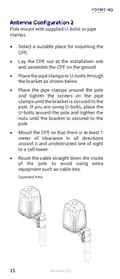
- 15. Pole Mount With Supplied U-bolts Or Pipe Clamps (Select A Suitable Place For Mounting The Cpe → Lay The Cpe Out At The Installation Site And Assemble The Cpe On The Ground → Mount The Cpe So That There Is At Least 1 Meter Of Clearance In All Directions → Route The Cable Straight Down The Inside Of The Pole To Avoid Using Extra Equipment Such As Cable Ties)
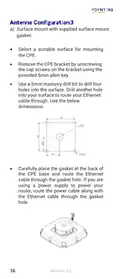
- 16. Surface Mount With Supplied Surface Mount Gasket (Select A Suitable Surface For Mounting The Cpe → Remove The Cpe Bracket → Drill Holes Into The Surface → Route Your Ethernet Cable Through The Gasket Hole → Use A Power Supply To Power Your Router)
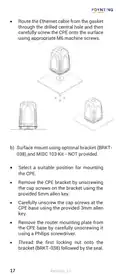
- 17. Route The Ethernet Cable (Surface Mount Using Optional Bracket → Select A Suitable Position For Mounting The Cpe → Remove The Cpe Bracket → Carefully Unscrew The Cap Screws At The Cpe Base → Remove The Router Mounting Plate From The Cpe Base → Thread The First Locking Nut Onto The Bracket)
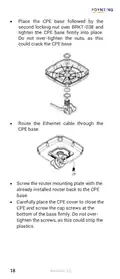
- 18. Place The Cpe Base (Route The Ethernet Cable → Screw The Router Mounting Plate → Carefully Place The Cpe Cover)
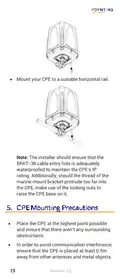
- 19. Mount Your Cpe To A Suitable Horizontal Rail. (Place The Cpe At The Highest Point Possible. → Ensure That The Cpe Is Placed At Least 0.5m Away From Other Antennas And Metal Objects.)
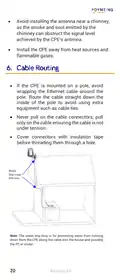
- 20. Avoid Installing The Antenna Near A Chimney (Install The Cpe Away From Heat Sources And Flammable Gases → If The Cpe Is Mounted On A Pole, Avoid Wrapping The Ethernet Cable Around The Pole → Never Pull On The Cable Connectors → Cover Connectors With Insulation Tape Before Threading Them Through A Hole → Water Drip Loop For Preventing Water From Running Down The Cable)
- 21. Installation Considerations (Safety Precautions → Professional Installation Assistance → Site Survey Before Installation → Weather Conditions For Installation → Personal Protective Equipment → Avoiding Distractions During Installation)
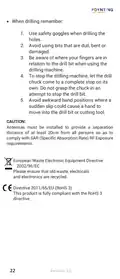
- 22. Use Safety Goggles When Drilling (Avoid Using Bits That Are Dull, Bent Or Damaged → Be Aware Of Where Your Fingers Are In Relation To The Drill Bit → To Stop The Drilling Machine, Let The Drill Chuck Come To A Complete Stop → Avoid Awkward Hand Positions → Antennas Must Be Installed To Provide A Separation Distance Of At Least 20cm From All Persons → Please Ensure That Old Waste, Electricals And Electronics Are Recycled)
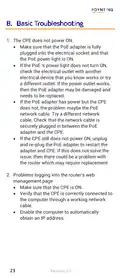
- 23. Cpe Does Not Power On (Problems Logging Into The Router's Web Management Page)
- 24.
×
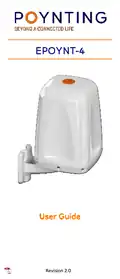
POYNTING EPOYNT-4 Outdoor LTE-5G Antenna and Router Enclosure User Guide
| General | Details |
|---|---|
| Name | POYNTING EPOYNT-4 Outdoor LTE-5G Antenna and Router Enclosure User Guide |
| Make | Poynting |
| Language | English |
| Filetype | PDF (Download) |
| File size | 0.31 MB |
If you have any questions regarding POYNTING EPOYNT-4 Outdoor LTE-5G Antenna and Router Enclosure User Guide, please ask here and describe the problem in detail.


Newland NL-81 Router User Manual

TP-Link Tri-Band Wi-Fi 6E Router User Guide

LANCOM 1793VAW VPN Router User Guide

HITACHI M 12SA2 Bit Machine Molding Router Instruction Manual

LINKSYS 750MR7500 Hydra Pro 6E Mesh Router User Guide

GL-INET GL-AR300M Shadow Mini Router User Guide

MERCUSYS AC12G Wireless Router Installation Guide

TELTONIKA Networks QSG RUT951 Wi-Fi Dual SIM Router Instruction Manual

CEDARouter C3 5G Aggregation Router User Guide

ZYXEL NR5307 5G NR Router Owner’s Manual
Table of Contents
- 1. Page 1 →
- 2. Page 2 →
- 3. Packingchecklist - Settingupthecpe →
- 4. Item Description - Epoynt-4 Cpe Only →
- 5. Epoynt-4 Cpe - Wall Knock-in Screw →
- 6. Pcb Mounting Screws - U-bolt →
- 7. The Html Code Does Not Contain Any Subheadings Related To In... →
- 8. Installation Instructions Of The Epoynt-4 Cpe - Install Your... →
- 9. To Access The Router Mounting Plate, Carefully Unscrew The C... →
- 10. Connect The Cpes Antenna Cables To The Respective Connectors... →
- 11. Connect The Ethernet Cable From The Cpes Base To The Router ... →
- 12. Carefully Place The Cpe Cover To Close The Cpe And Screw The... →
- 13. Power Your Cpe →
- 14. Ensure Waterproofing Of Rf/electrical Connections - Wall Mou... →
- 15. Pole Mount With Supplied U-bolts Or Pipe Clamps - Select A S... →
- 16. Surface Mount With Supplied Surface Mount Gasket - Select A ... →
- 17. Route The Ethernet Cable - Surface Mount Using Optional Brac... →
- 18. Place The Cpe Base - Route The Ethernet Cable →
- 19. Mount Your Cpe To A Suitable Horizontal Rail. - Place The Cp... →
- 20. Avoid Installing The Antenna Near A Chimney - Install The Cp... →
- 21. Installation Considerations - Safety Precautions →
- 22. Use Safety Goggles When Drilling - Avoid Using Bits That Are... →
- 23. Cpe Does Not Power On - Problems Logging Into The Router's W... →
- 24. Page 24 →