
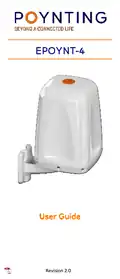
POYNTING EPOYNT-4 Outdoor LTE-5G Antenna and Router Enclosure User Guide



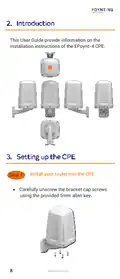
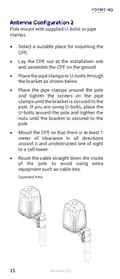
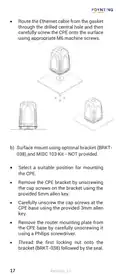



Pole mount with supplied U-bolts or pipe
clamps.
•
•
•
•
Select a suitable place for mounting the
CPE.
Lay the CPE out at the installation site
and assemble the CPE on the ground.
Place the pipe clamps or U-bolts through
the bracket as shown below.
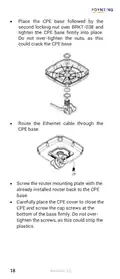
Place the pipe clamps around the pole
and tighten the screws on the pipe
clamps until the bracket is secured to the
pole. If you are using U-bolts, place the
U-bolts around the pole and tighten the
nuts until the bracket is secured to the
pole.
•
•
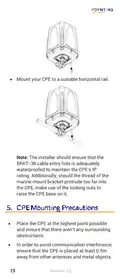
Mount the CPE so that there is at least 1
meter of clearance in all directions
around it and unobstructed line of sight
to a cell tower.
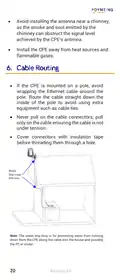
Route the cable straight down the inside
of the pole to avoid using extra
equipment such as cable ties.
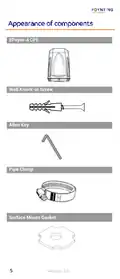
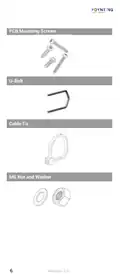
Exploded View
15
Revision 2.0

| General | Details |
|---|---|
| Name | POYNTING EPOYNT-4 Outdoor LTE-5G Antenna and Router Enclosure User Guide |
| Make | Poynting |
| Language | English |
| Filetype | PDF (Download) |
| File size | 0.31 MB |
 (1 votes, average: 5.00 out of 5)
 Loading...
If you have any questions regarding POYNTING EPOYNT-4 Outdoor LTE-5G Antenna and Router Enclosure User Guide, please ask here and describe the problem in detail.


STRONG 5GROUTERAX3000 5G Router Instructions

MAGNADYNE RV2458 Router User Guide

TP-Link TL-WR902AC Mbps Wireless Portable Mini Travel Router Owner’s Manual

Falcon FN-4G-300P 4G LTE Portable 300MBPS Router User Manual

ARISTA AWE-5510 Wifi Router User Guide

ASUS RT-AX57 Dual Band WiFi Router User Guide

Tenda 4G185 4G/3G Portable Mobile Hotspot Router User Guide

RYOBI RTR18 Trim Router Instruction Manual

D-Link DWR-M930DS 4G Dual SIM LTE Router Installation Guide

LANCOM 1793VA VPN Router User Guide