
POYNTING EPOYNT-4 Outdoor LTE-5G Antenna and Router Enclosure User Guide



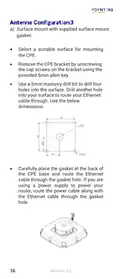
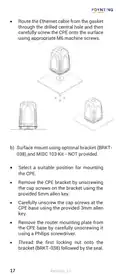
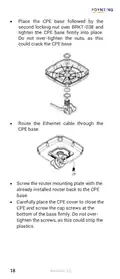


a) Surface mount with supplied surface mount
gasket.
•
•
Select a suitable surface for mounting
the CPE.
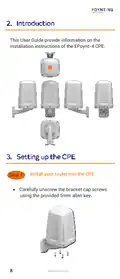
Remove the CPE bracket by unscrewing
the cap screws on the bracket using the
provided 5mm allen key.
•
Use a 6mm masonry drill bit to drill four
holes into the surface. Drill another hole
into your surface to route your Ethernet
cable through. Use the below
dimensions.
•
Carefully place the gasket at the back of
the CPE base and route the Ethernet
cable through the gasket hole. If you are
using a power supply to power your
router, route the power cable along with
the Ethernet cable through the gasket
hole.
16
Revision 2.0

| General | Details |
|---|---|
| Name | POYNTING EPOYNT-4 Outdoor LTE-5G Antenna and Router Enclosure User Guide |
| Make | Poynting |
| Language | English |
| Filetype | PDF (Download) |
| File size | 0.31 MB |
 (1 votes, average: 5.00 out of 5)
 Loading...
If you have any questions regarding POYNTING EPOYNT-4 Outdoor LTE-5G Antenna and Router Enclosure User Guide, please ask here and describe the problem in detail.


araknis NETWORKS 520 Dual WAN Multi Gigabit VPN Router Instruction Manual

MOFI NETWORK MOFI6500 4G LTE Router User Manual

UfiSpace S9600-32X 100G Aggregation Router Installation Guide

NETGEAR RS200 Nighthawk WiFi 7 Dual Band Router Owner’s Manual

Cisco RV260W Router User Guide

LINOVISION IOT-R32 Wholesale Rugged and Versatile Cellular Router User Guide

WAVLINK AC1200 Dual Band Wi-Fi Extender/AP User Guide

TP-Link G36W-4G Omada Pro 4G Cat6 Gigabit VPN Router Installation Guide

ADVANTECH SL302 SmartStart LTE Router User Manual

MAIYUAN AC1200M Wireless Router User Guide