
Home > Vantron Technology > Vantron Technology R105 Router User Manual
Vantron Technology R105 Router User Manual




Vantron| Embedded in your success, Embedded in your better life
World-leading provider of embedded/IoT products and solutions
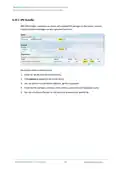
Description of the numbered areas
1. Enable the rule
2. Select the Work as server mode
3. Input the port number (user-defined)
difference between the protocols)
5. Select the serial device from the drop-down (software node of RS232 port is
6. Select 115200 as the baud rate (the default value will be the one selected when
setting up the rule)
7. Set a timeout value
8. Select “8 bits” for the data bit
9. Select “None” for parity
10. Select “1” as the stop bit
Be sure to save above settings before you exit.
(2) The Ser2net process is running as follows:
/usr/sbin/ser2net -n -c /tmp/ser2net.conf
R105 Industrial Router | User Manual
96

| General | Details |
|---|---|
| Name | Vantron Technology R105 Router User Manual |
| Make | Vantron Technology |
| Language | English |
| Filetype | PDF (Download) |
| File size | 0.51 MB |
 (1 votes, average: 5.00 out of 5)
 Loading...
If you have any questions regarding Vantron Technology R105 Router User Manual, please ask here and describe the problem in detail.


NEXTIVITY SHIELD MegaFi 2 Fixed Wi-Fi 6 Mobile Router User Guide

ExpressVPN AXG1800 Travel Router Instruction Manual

TP-Link Qmada Gigabit VPN Router Installation Guide

TP-Link TL-WR3002X Portable Router Installation Guide

NETGEAR RS100 Nighthawk Dual Band WiFi 7 Router User Guide

Tenda 4G03 Pro 4G LTE Router Installation Guide

eero V010001 Router User Guide

Трохи зачекайте…

casa systems NTC-500 AurusXT 5G IoT Router Instructions

Quwireless RUT976 Series Red Cap 5G Router Installation Guide