
Home > Vantron Technology > Vantron Technology R105 Router User Manual
Vantron Technology R105 Router User Manual




Vantron| Embedded in your success, Embedded in your better life
World-leading provider of embedded/IoT products and solutions
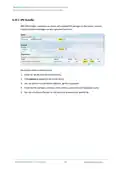
VantronOS offers a platform for connecting R2 to R1 and configuring the PLC and R2. For
other settings, please download the related software program and finish the setup.
Description of the numbered areas
1. Download and save the .ovpn file after setting up the OpenVPN server on R1, then
click this button to open the directory of the file
2. Click Connect to connect R2 to the OpenVPN server built by R1
3. After connection, an IP address assigned by the OpenVPN server will be displayed here
4. Input a static IP address for the PLC (on the same IP network as the LAN port of R2)
5. Input a virtual IP for the PLC (on the same IP network as the one assigned by the
OpenVPN server and not occupied by other clients)
Be sure to save above settings to allow them to take effect.
R105 Industrial Router | User Manual
99

| General | Details |
|---|---|
| Name | Vantron Technology R105 Router User Manual |
| Make | Vantron Technology |
| Language | English |
| Filetype | PDF (Download) |
| File size | 0.51 MB |
 (1 votes, average: 5.00 out of 5)
 Loading...
If you have any questions regarding Vantron Technology R105 Router User Manual, please ask here and describe the problem in detail.


TANGERINE BYO Router Instruction Manual

VONETS VAP11S-232 WiFi Bridge Repeater Router User Guide

HFCL Weave Home Mesh Router User Guide

LANCOM 1793VAW VPN Router User Guide

xiaomi RB02 AC1200 Gigabit Router User Manual

TCL HH512LV Linkhub 5G WLAN Router User Guide

UBIQUITI NETWORKS ER-12 10 Port Gigabit Router User Guide

altice UBN2309 XGS-PON Labs Delivers Router Instruction Manual

NETGEAR MR90 Nighthawk Tri-band Mesh Wi-Fi 6E Router Owner’s Manual

Imou AX3000 300 Mbps Wi-Fi 4G LTE Router User Guide