
Home > Vantron Technology > Vantron Technology R105 Router User Manual
Vantron Technology R105 Router User Manual




Vantron| Embedded in your success, Embedded in your better life
World-leading provider of embedded/IoT products and solutions
3.13.3 Administration
On this page, you can reset the password for accessing the Router.
SSH Access
As this function might compromise the security of the network, you have to log in the web
interface with a root account.
Step 1: Log out the interface by clicking Logout at the left bottom corner;
Step 2: Log in with the root account (root) and password (rootpassword);
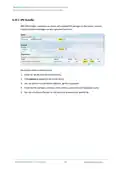
Step 3: Navigate to System > Administration, and enable dropbear;
Description of the numbered areas
1. Select a port to access (LAN by default)
When “unspecified” is selected, all the ports will be monitored.
2. Specify a port for monitoring (port 22 by default)
3. Allow SSH password authentication
4. Add SSH-Keys for public key authentication
R
1
0
5
I
n
d
u
s
t
r
i
a
l
R
o
u
t
e
r
|
U
s
e
r
M
a
n
u
a
l
104

| General | Details |
|---|---|
| Name | Vantron Technology R105 Router User Manual |
| Make | Vantron Technology |
| Language | English |
| Filetype | PDF (Download) |
| File size | 0.51 MB |
 (1 votes, average: 5.00 out of 5)
 Loading...
If you have any questions regarding Vantron Technology R105 Router User Manual, please ask here and describe the problem in detail.


TP-Link AX5400 Multi Gigabit Wifi 6 Router User Guide

ASUS XT12 AX11000 Tri Band WiFi Router User Guide

TP-Link BE19000 Tri-Band Wi-Fi 7 Router Installation Guide

NETGEAR Nighthawk BE6500 BE5000 Dual Band Wi-Fi Router User Guide

NETGEAR MR6450 5G Mobiler Router Instruction Manual

DIGITAL DEEP SEA 5G Xtream 5G/4G Router Instruction Manual

hitron CGNM-2250 Cable Modem Router User Guide

UBIQUITI NETWORKS 2.4GHz Air Router User Guide

HALNY HLE-3GM Router Installation Guide

THREE CJB74V0HWAAC 4G Plus MiFi Mobile WiFi Router User Guide