
Home > Vantron Technology > Vantron Technology R105 Router User Manual
Vantron Technology R105 Router User Manual




Vantron| Embedded in your success, Embedded in your better life
World-leading provider of embedded/IoT products and solutions
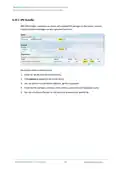
Description of the numbered areas
1. Enable the rule
2. Select the Work as client mode
3. Input the server address and port number (Ubuntu host shall be the server, and port
number is user-defined)
4. Select the serial device from the drop-down list (software node for RS232 port is
5. Select 115200 as the baud rate (the default value will be the one selected when
setting up the rule)
6. Set a timeout value
7. Select “8 bits” for the data bit
8. Select “None” for parity
9. Select “1” as the stop bit
S
a
v
e
a
n
d
A
p
p
l
y
a
b
o
v
e
s
e
t
t
i
n
g
s
b
e
f
o
r
e
y
o
u
e
x
i
t
.
(2) The Ser2net process is running as follows:
uart2net -c -d 192.168.93.1 -p 8888 -t /dev/ttyS1 -b 115200 -a 8 -r none -s 1 -o 20
R105 Industrial Router | User Manual
93

| General | Details |
|---|---|
| Name | Vantron Technology R105 Router User Manual |
| Make | Vantron Technology |
| Language | English |
| Filetype | PDF (Download) |
| File size | 0.51 MB |
 (1 votes, average: 5.00 out of 5)
 Loading...
If you have any questions regarding Vantron Technology R105 Router User Manual, please ask here and describe the problem in detail.


ASUS RT-AX82U V2 AX5400 Dual Band WiFi Router User Guide

Linuxiac LinkStar-H68K Portable WiFi Pocket Router User Guide

Cudy GP1200V xPON VoIP Wi-Fi Router Installation Guide

UBIQUITI NETWORKS ER-12 10 Port Gigabit Router User Guide

ZTE MC888 Pro 5G CPE Router User Guide

MEIG SRT838iPro 5G CPE WiFi Router User Manual

inseego 5G Router FG2000e User Guide

NOKIA ONT G-1426G-A Dual Band Wi-Fi 6 Mesh Router User Guide

TCL HH515V 5G Home Station Router User Guide
3onedata IRT5300L-5T2D-2P12_36 4G Wireless Router Installation Guide