
Home > Vantron Technology > Vantron Technology R105 Router User Manual
Vantron Technology R105 Router User Manual




Vantron| Embedded in your success, Embedded in your better life
World-leading provider of embedded/IoT products and solutions
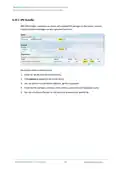
Under Advanced Settings tab, you can further set up the monitoring activities.
Description of the numbered areas
1. Set the maximum count of entries to store in the database (‘0’ for no limit)
2. Check the box to pre-allocate a database (more frequently applicable to devices with
less memory space)
3. Check the box to compress the database
4. Maximum count of reporting periods to store (‘0’ for no limit)
5. Time interval for submitting the temporary database to the persistent database
6. Time interval for refreshing the traffic counters from the netlink information
7. Directory of the database
Protocol Mapping can be used to distinguish traffic types per host. Each mapping takes
one line, with the first value being the IP protocol, the second value being the port
number, and the third value being the name of the mapping protocol.
R105 Industrial Router | User Manual
103

| General | Details |
|---|---|
| Name | Vantron Technology R105 Router User Manual |
| Make | Vantron Technology |
| Language | English |
| Filetype | PDF (Download) |
| File size | 0.51 MB |
 (1 votes, average: 5.00 out of 5)
 Loading...
If you have any questions regarding Vantron Technology R105 Router User Manual, please ask here and describe the problem in detail.


HUAWEI B818-263 4G Prime Router User Guide

Red Fox 2 CNC Router Installation Guide

Cudy WR2100 Gigabit Dualband WLAN Mesh Router Installation Guide

TELTONIKA RUTM31 Router User Guide

amped wireless RTA1750 High Power Wi-Fi Router User Guide

MICRONET AX1800 Dual Band Wi-Fi 6 Router User Guide

LANCOM 1781-4G VPN Router User Guide

Maiyuan AX3000W Router Installation Guide

HQTelecom HQ-3232B-911 Call Re Router Instruction Manual

Dynalink DL-WRX36 WiFi 6 AX3600 Router User Guide