
Home > Vantron Technology > Vantron Technology R105 Router User Manual
Vantron Technology R105 Router User Manual




Vantron| Embedded in your success, Embedded in your better life
World-leading provider of embedded/IoT products and solutions
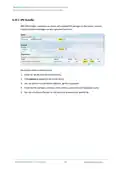
Under the Configuration tab, you can customize the configuration files or directories to be
retained during the upgrade.
Description of the numbered areas
1. Input the configuration file or directory to be retained during the upgrade
2. Click Submit to confirm the setting
3. Open the list of configuration files kept during the upgrade
3.13.7 Reboot
Make sure you don’t have any ongoing process before rebooting the Router.
3.14 Logout
You will exit the web interface with a click on the Logout tab. If you need make changes
to any of your settings, you can log in the web again with default password: admin. Make
sure you have saved the changes before logout.
R105 Industrial Router | User Manual
112

| General | Details |
|---|---|
| Name | Vantron Technology R105 Router User Manual |
| Make | Vantron Technology |
| Language | English |
| Filetype | PDF (Download) |
| File size | 0.51 MB |
 (1 votes, average: 5.00 out of 5)
 Loading...
If you have any questions regarding Vantron Technology R105 Router User Manual, please ask here and describe the problem in detail.


TP-Link MR600 4G Cat6 Wireless Dual Band Gigabit Router User Manual

DrayTek Vigor2762 Series ADSL2-2+ and VDSL2 Router User Guide

LINOVISION IoT-R32L Router User Guide

Anywhere AX50 Series Dual Band Gigabit Wi-Fi 6 Router User Guide

ASUS RT-AC86U AC2900 WiFi Gaming Router User Guide

TP-Link VR2100v Wireless Mu Mimo VDSL ADSL Modem Router Instruction Manual

CP PLUS CP-GR-DE412 Dual-Band 4G Router Installation Guide

IQ WiFi 6 Router Installation Guide

NETGEAR LBR20 ORBI LTE Router Instructions

TP-Link GE550 Tri Band Wi-Fi 7 Gaming Router Installation Guide